
 Gaurav Bodhare
The best server migration leaves no trace on the customer side. Visitors keep browsing, orders keep arriving, and the only visible change is a faster response after the switch. A Hetzner VPS carries real production weight, including applications, databases, and email routes, and a move needs a plan as precise as the workload itself. This checklist provides that plan in a clear sequence.
Teams that leave Hetzner often want managed support, predictable renewals, and a broader range of services from one provider. At MilesWeb, our web hosting team supports that goal with VPS plans built for migrated workloads. In this blog, we will explore why the move makes sense, how to prepare the infrastructure, the steps for transferring Docker containers and volumes, and the timing of the DNS cutover.
Table Of Content
Why migrate from Hetzner?
Hetzner delivers strong hardware value, yet workloads evolve faster than server plans. A growing store, a new client portfolio, or a compliance review often creates requirements that raw compute alone does not meet. Migration becomes the practical solution, and timing is relevant because every quarter of delay adds more data, more dependencies, and a longer transfer. An early move keeps the process short and the risk low. Typical reasons for the migration include:
- Need for managed support instead of full in-house server administration
- Requirement for a data center closer to the customer base
- Demand for bundled backups and business email
- Plans to consolidate several servers with one provider
How Should Teams Prepare to Move from Hetzner?
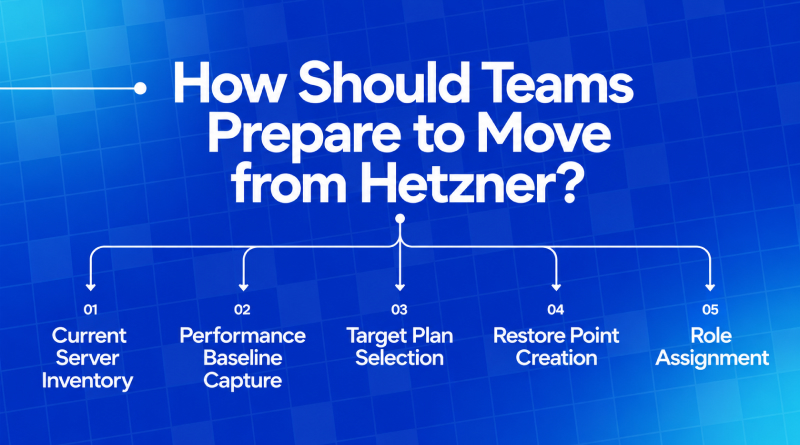
A Hetzner migration runs smoothly when the preparation is finished before any data moves. Five steps cover the groundwork: documenting the current server, measuring its performance, selecting the destination plan, securing a restore point, and assigning clear roles. Each step lowers the risk of downtime and keeps the cutover predictable.
Migration Steps
Pre-Migration Checklist
What is the eight-step checklist for a successful migration?
The table below converts the project into eight ordered steps, and each step maps to a section of this guide. Teams that follow the sequence keep every VPS hosting change predictable, from the first audit to the final verification.
Step-by-Step Execution
8-Step Migration Roadmap
Each row closes with a measurable outcome, which turns the checklist into an approval sheet for the whole team.
How can teams Verify Root and SSH access?
Root and SSH access control every step of a server migration, so confirming both early prevents delays later. Testing login on both servers and securing the SSH configuration are the two checks that put the team in a safe position to begin.
Verify Dual Server Access
Every later step depends on root access, so the team tests it on both servers before any data moves. Each administrator adds a public key to the new VPS and keeps the existing Hetzner keys active. Key-based SSH login is the safer route on both machines. The old server remains reachable until final verification, because a rollback depends on that connection.
- Test root or sudo login on the new VPS with each key pair
- Keep the Hetzner server reachable until sign-off
- Store recovery console details in a shared password vault
SSH Login Security
Confirm that port 22, or the custom SSH port, accepts connections from office and VPN addresses. Fail2ban or a similar tool blocks addresses after repeated failed logins. Disable password authentication in the SSH configuration after each administrator confirms a working key login.
How to move Docker containers and volumes to a new server?
Before moving your Docker workloads, review the current server setup and list everything that needs to be transferred. This includes containers, volumes, databases, networks, environment files, and other dependencies required to run the stack.
01
Packaging
Image and Compose File Transfer
Export compose files, environment configurations, and image tags to a private registry or archive. Identical tags on the destination server reproduce the exact same runtime behavior.
02
Synchronization
Transfer Volumes and Databases
Pause writing containers, archive named volumes using tar via rsync over SSH, and execute database dumps and restores with checksum validation.
03
Networking
Recreate Networks
Rebuild Docker bridge networks, reverse proxy configurations (Nginx/Traefik), and ensure secure transmission of credentials through encrypted channels.
04
Cutover
Go-Live Execution
Spin up the stack, validate endpoints via hosts files, run user and system checks, analyze container logs, and execute the final DNS cutover.
How should teams decide the cutover window and DNS TTL timing?
A well-planned cutover helps teams reduce downtime and avoid data inconsistencies during the server move. Set the timing, DNS records, and final sync steps in advance so everyone knows when and how the switch will happen.
01
Timing
Choose the Window
The baseline data shows when visitor traffic reaches its lowest point, and that time is the ideal cutover window. Share the window with the team, freeze new deployments, and appoint one lead.
02
DNS
DNS TTL Adjustment
Lower the DNS TTL to 300 seconds at least 48 hours before cutover. Point the A record to the new IP address after sync, and raise the TTL back after stable performance.
03
Sync
Final Data Sync
Pause writes on the Hetzner server, run a last rsync, and take a fresh database dump. Restore the database on the new VPS, place a test order, and confirm admin entries.
04
Verification
Post-Migration Verification
Watch error logs, response times, and email delivery closely for the first hour. A list of five key pages and one test transaction confirms the website performs properly.
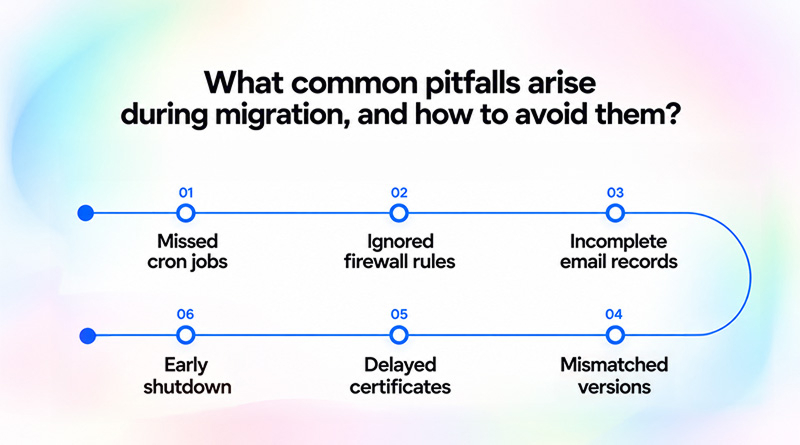
What common pitfalls arise during migration, and how to avoid them?
Most migration issues trace back to a small set of oversights, and each has a simple prevention.
-
01
Missed cron jobs
Export the crontab and systemd timers during the audit, and recreate them on the new server.
-
02
Ignored firewall rules
Copy the UFW or iptables rules, and open only the ports the applications need.
-
03
Incomplete email records
Add MX, SPF, DKIM, and DMARC to the new DNS zone first, or mail bounces and lands in spam.
-
04
Mismatched versions
Mirror the PHP, Node, and database releases from Hetzner, and check for deprecated settings.
-
05
Delayed certificates
Issue the SSL certificate on the new server the moment DNS resolves.
-
06
Early shutdown
Keep the Hetzner server active for seven days after cutover as a fallback.
Why choose MilesWeb for a migrated VPS workload?
At MilesWeb, our VPS plans host migrated workloads on dedicated resources and scale as demand grows. Each hosting plan includes free professional email accounts and daily backups, so business email and recovery are ready on day one. A single account covers hosting, email, and support, which keeps renewals, billing, and records easy to track. That structure simplifies every future upgrade and keeps the new server organized for years to come.
Concluding Insights
A migration completed with this checklist gives the infrastructure a stronger foundation for growth. Documented services, validated containers, and a planned DNS switch turn a complex project into a repeatable process, and the same checklist supports every future upgrade.
A finished migration leaves your team with a documented, monitored server, and that foundation makes every future upgrade faster to plan and simpler to run. With that base in place, our VPS plans at MilesWeb are ready to carry your workloads through each new stage of growth.
Frequently Asked Questions
1. How long does migrating a Hetzner VPS typically take?
A single server with a few applications usually moves in one to three days, and most of that time goes to testing. Database size is the biggest variable, since a 50 GB database takes far longer to export and restore than a 2 GB one. Projects with several servers need a longer schedule, so plan each server as its own task.
2. Will migrating from Hetzner affect my website’s uptime?
Visitors stay on the Hetzner server until the DNS record points to the new IP address, so the old website keeps running during the entire build and test phase. The only interruption comes from the final data sync, and it lasts a few minutes. A lowered TTL and a tested new server keep that window short.
3. Can Docker containers and volumes be migrated without losing data?
Yes, provided the writing containers are stopped before any volume is copied. A database that keeps running changes its files mid-copy, which is how data goes missing. Pause the containers first. Then rsync copies each volume, and identical checksums on both servers show that every file made the trip.
4. Do I need root access on the new VPS to complete the migration?
Yes. Without root or sudo access, the new VPS will refuse a Docker install or a firewall change, so test that login before any data moves. Installing Docker, editing firewall rules, and configuring the reverse proxy all need advanced privileges. Test that login before any data moves, so a permissions problem never appears halfway through the project.
5. What happens to my existing Hetzner account after migration is complete?
Nothing changes on its own. The server keeps running and billing until you cancel it, which makes it a ready fallback in the first week. Once the logs, backups, and email delivery appear stable on the new VPS, please delete the server and verify the billing dates to ensure charges stop accordingly.