 Jyoti Prasad
Running a business is not just about managing sales. Modern-day companies need to manage their relationships with customers, inventory, marketing, human resources, and overall operations—all through a single system. Moreover, the system should eliminate the need for multiple disconnected tools or software applications. This is where the Odoo ERP software solution comes into play.
It’s crucial to select the best hosted ERP environment to optimize performance from your centralized management system and achieve maximum uptime and flawless integration. Odoo ERP is one of the most widely used and recognized global business management solutions available. It allows businesses of all sizes to manage multiple business aspects simultaneously.
With Odoo ERP, companies manage their customers and suppliers, create invoices, track inventory, manage employees, and build e-commerce websites. Thus, when you use Odoo, you get a complete ecosystem for integrating all these functions.
In this MilesWeb beginner’s guide, we will explain everything you need to know about Odoo ERP, including how it operates, the various core modules of Odoo, the advantages and disadvantages of using Odoo, pricing, real-life use of Odoo, and whether Odoo is a good fit as an ERP system for your business.
Key Summary — Odoo ERP
- 1 Oddo ERP is a comprehensive business management suite that integrates core operations like sales, accounting, inventory, HR, marketing, and customer management into a single platform.
- 2 Originally launched as TinyERP (2005) and later evolved into OpenERP, it has grown into a full-scale ERP system used by businesses of all sizes to streamline and centralize workflows.
- 3 Its biggest strength is its modular structure, allowing businesses to start with essential apps like CRM or accounting and expand later into advanced modules such as manufacturing, payroll, project management, and e-commerce.
- 4 Because of its flexibility and scalability, it is widely adopted by startups, SMEs, and enterprises looking for an all-in-one customizable business management solution.
- 5 Key advantage: Odoo helps reduce operational complexity by unifying multiple business tools into a single ecosystem, improving efficiency and decision-making.
💡
This summary explains how Odoo works as a modular ERP system for modern businesses.
Table Of Content
What is Odoo ERP?
Odoo was originally called TinyERP and was founded by Belgian entrepreneur Fabien Pinckaers in 2005. As Odoo has grown and developed over the years, it has transformed from an open-source ERP project into a full-featured business management software program. Currently, Odoo has more than seven million users in over 160 countries.
Unlike most traditional ERP systems, Odoo has an open-source, modular structure that allows for a great deal of flexibility and feature extensibility. Thus, businesses now don’t need large investments or complicated systems. Instead, it is possible to get started with minimal required modules, such as CRM, accounting, inventory, or HR. In addition to that, businesses can add more modules to their growth trajectory. This combination of flexibility, scalability, and affordability is what makes Odoo appealing to startups, small and medium businesses (SMEs), eCommerce businesses, manufacturers, wholesalers, and service-based businesses.
With the top-notch features, Odoo is a strong contender to compete against large traditional ERP companies like SAP and Oracle for smaller and mid-sized companies.
Here’s a quick overview of Odoo ERP:
| Feature | What Odoo Offers |
| ERP Type | Open-source and modular ERP software |
| Best For | Startups, SMEs, eCommerce, manufacturers, service businesses |
| Core Functions | CRM, accounting, HR, inventory, manufacturing, website, marketing |
| Deployment Options | Cloud-hosted or self-hosted |
| Customization | Extensive customization with modules and apps |
| Pricing | Free Community Edition + Paid Enterprise plans |
| Key Advantage | All business operations managed from one platform |
How Does Odoo ERP Work?
Easy! Odoo connects all of your different operations into a single platform called a “modular system.” When you have an order placed via the sales module, you also have the following:
- An invoice created for the order in the accounting module.
- The stock level of your product is updated in inventory management.
- The warehouse team is notified for fulfillment.
- The customer’s history is stored in CRM (customer relationship management).
- An automated email is sent out using the marketing module.
All these processes carried out once reduce the manual work and eliminate the risk of human errors because your operations are no longer separate from each other and don’t require any additional steps to be completed. Odoo is also popular for its real-time synchronization, which improves operational efficiency, reduces dependencies on software, and increases visibility into overall business.
Odoo ERP’s modular structure gives businesses the power to add only what they need and then expand as their operations grow. Furthermore, Odoo can be deployed either in the cloud server or locally (on your own server). If you need complete control over customization, server configurations, and deployments, then you should typically use a VPS hosting or dedicated hosting environment to run your Odoo ERP system efficiently.
How Odoo ERP operates within a company:
| Business Activity | Odoo Module Involved | Automated Outcome |
|---|---|---|
| Customer inquiry | CRM | Lead gets stored and tracked |
| Product purchase | Sales | Sales order gets created |
| Payment received | Accounting | Invoice and payment records update |
| Product shipped | Inventory | Stock levels adjust automatically |
| Employee attendance | HR | Payroll calculations sync |
| Marketing campaign | Marketing Automation | Leads and customer engagement tracked |
What Are the Core Odoo Modules? Explained
Odoo ERP is popular largely because there are so many different business applications that can be integrated with it. Although Odoo possesses dozens of different modules, most businesses use a handful as their primary means of managing daily operations.
These modules integrate seamlessly with each other so that businesses can automate their workflow while keeping all of their departments on the same page with centralized data.
Core Odoo Modules List
| Odoo Module Category | Main Purpose | Best For | Key Benefit |
|---|---|---|---|
| Sales & CRM | Manage leads, sales pipelines, quotations, and customer relationships | Sales teams and customer management | Improves conversion and client tracking |
| Accounting & Finance | Invoicing, bookkeeping, taxes, expenses, and financial reporting | Finance and accounting operations | Automates financial workflows |
| Inventory | Track stock levels, warehouses, shipments, and procurement | Retail, wholesale, and logistics | Real-time stock visibility |
| Manufacturing | Production planning, bill of materials, and work orders | Manufacturing businesses | Streamlines production process |
| HR & Payroll | Employee records, attendance, recruitment, and payroll | Workforce management | Simplifies HR operations |
| Website & eCommerce | Build websites, online stores, and customer portals | Online businesses and digital brands | End-to-end online presence |
| Marketing | Email campaigns, automation, SMS, and social marketing | Customer engagement and lead generation | Boosts customer acquisition |
Odoo modules work together in a unified ERP system to streamline business operations across departments.
– CRM & Sales Module
The CRM and sales modules are for helping companies keep track of all facets of the customer’s experience from lead generation to sale. Sales can be tracked, followed up with, quoted, and have the deal tracked through a visual pipeline. This gives you the opportunity to view customer activity with one click instead of needing to switch between systems.
Main features include:
- Identifying and tracking leads/opportunities
- Automated follow-up reminders
- Sales forecasting
- Quote and invoice creation
- Tracking customer communication
For businesses questioning whether Odoo is an ERP or a CRM, the answer is “it’s both.” Odoo can act as a fully functional CRM as well as a fully functional ERP, all under one ecosystem.
– Accounting & Finance Module
The accounting module is one of Odoo’s highest-rated modules primarily because it integrates seamlessly into sales, inventory, purchasing, and payroll functions. It automates the invoice creation, payment tracking, tax calculation, and expense management processes. Businesses thus get the benefit of multiple software without spending on multiple system apps.
Main features include:
- Automatic invoicing
- Bank account reconciliation
- GST/tax management
- Tracking expenses
- Financial reporting with dashboards
- Support for multiple currencies
This centralized view of financials allows businesses to decrease errors in accounting and to make better decisions.
– Inventory Management Module
The inventory management module is designed for businesses monitoring stock in real-time and needing control over their warehouse.
While standard inventory software often only monitors inventory levels, with Odoo, you can carry out more advanced warehouse tasks. This comprises the ability to scan items by barcode, automate inventory replenishment, transfer items in batches, track inventory across multiple locations, and automatically reorder stock.
Main features include:
- View movement of stock in real-time
- Manage more than one warehouse
- Automatically create purchase orders
- Receive warning notifications when products are running low
- Streamline their shipping and receiving processes
This is particularly beneficial for e-commerce businesses, wholesalers and distributors, and manufacturers who have large inventory items.
– Website and eCommerce Module
Odoo provides businesses with a complete eCommerce hosting platform with the required functionality to build their website without any other third-party tools. By integrating all aspects of a business’s operations into one complete solution, Odoo makes it effortless for customers to do business with its clients via its eCommerce module.
Main features include:
- Website builder with drag-and-drop convenience
- Online payment gateway integration
- Product catalogs available online
- Customer portal creation
- SEO tools available for optimization
- Integrated order management solution
If you plan to merge ERP functions with selling on a web-based portal, Oddo is your single location to operate and manage all (hosting a website vs. a backend).
What Are the Pros and Cons of Using Odoo?
Just like all ERPs, Odoo also has both of its good and bad characteristics. Although many find Odoo to be flexible, modularized, and relatively inexpensive, some businesses mark it as difficult with respect to its learning curve and how long it will take to get implemented.
Here are both pros and cons of the Odoo ERP system.
👍 Odoo Pros
Modular system lets businesses add features as they grow
Open-source flexibility allows deep customization
Combines CRM, accounting, inventory, HR, and marketing in one platform
More affordable than traditional ERP systems like SAP or Oracle
Real-time data synchronization across departments
Supports cloud hosting and self-hosted deployment
Large app marketplace with thousands of integrations
⚠️ Odoo Cons
Initial setup can feel complex for beginners
Advanced customization often requires technical expertise
Enterprise implementation may require dedicated developers or partners
Some third-party apps may involve additional costs
Large-scale deployments need strong hosting infrastructure
Learning curve increases when multiple modules are integrated
Community support varies depending on module complexity
How to Get Started with Odoo ERP?
If you are a small or medium-sized business, Odoo ERP can be implemented relatively easily with all the modules available. This ensures users begin with only the most necessary modules and build out from there as their businesses grow and develop.
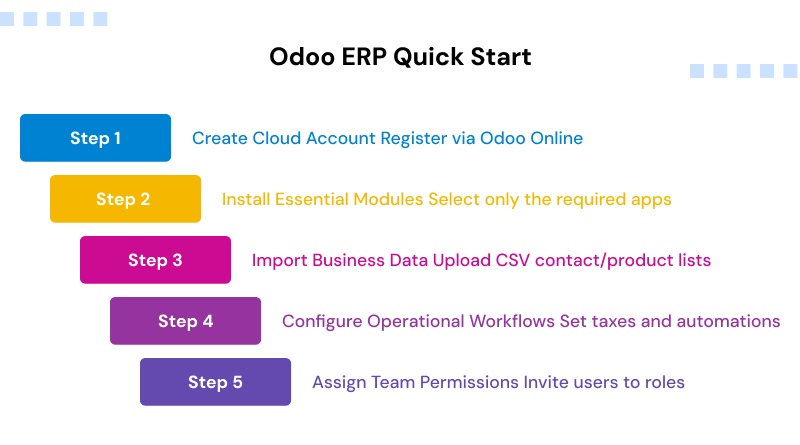
Below is a step-by-step outline to get started with Odoo ERP for beginners.
Step 1: Sign up for a free Odoo account
The first thing you will need to do is register for an account, either via the free trial or the community version of Odoo. When registering an account, businesses have three options from which to choose:
- Online on Odoo (cloud hosting)
- On the Odoo.sh platform
- As a self-hosted instance (VPS or dedicated server)
When starting out, the easiest option for a new user is the online option. Here, the user doesn’t have to manage the server infrastructure or go through the time-consuming process of setting it up.
Once the account is registered, Odoo will prompt you for your company information, like:
- Company name
- Type of business
- Number of employees
- Apps do you plan to use
Once you finish registering your account, you can view the Odoo dashboard and access the app store in Odoo.
Step 2: Choose Your Required Modules
After you register your account, the next step is to select the modules that your business operation needs. Odoo does not have all of the features activated on your account at the time of registration. It rather allows you to gradually activate features as you want, depending on your business growth and development.
Some examples of beginner modules include:
- CRM: Manage sales
- Accounting: Invoice and money
- Inventory: Track inventory
- Website: Online Presence
- HR: Manage employees, etc.
For example:
- An e-commerce company generally activates the website and inventory modules first.
- A service type generally activates the CRM and project management modules.
- A manufacturer activates the inventory and scheduling/production planning modules.
This way, the systems remain organized and less complicated when first starting out.
Step 3: Set Up Business Data and Workflows
After installing modules, businesses move on to configuring the company’s operational data within the ERP software.
The setup phase generally includes:
- Adding and importing customers/vendors
- Adding products and pricing
- Setting tax codes/accounting rules
- Setting inventory locations
- Creating employee profiles
- Creating/defining approval workflows
Odoo has the capability of importing from CSV format, which allows businesses to migrate over from an existing system or spreadsheet via CSV import instead of manually entering data into the system.
During this stage of the implementation process, the business also provides customized dashboards, creates automation rules, or sets up reporting.
Step 4: Invite Your Team and Start Using Odoo
The final step before beginning to use Odoo is inviting your employees to join the system and assigning user roles based on their responsibilities.
This comprises:
- Sales team-customer relationship management access
- Finance team-accounting access
- Warehouse staff-inventory access
- HR department-employee record access
By creating role-based permissions, businesses protect their data and ensure each department only has access to the specific tools necessary for their job. Once users are created in Odoo, businesses can begin conducting daily operations seamlessly through one platform.
Odoo ERP Implementation Timeline
The implementation timelines for Odoo ERP vary by size of each organization, level of customization required, and number of modules being implemented.
| Business Type | Estimated Implementation Time |
| Small & Medium Businesses (SMBs) | 2–4 weeks |
| Large Enterprises | 3–6 months |
Typically, smaller organizations implementing regular modules commence implementation with ease compared to large corporations. However, large organizations implement sophisticated workflows, customized modules, and departmental processes. Thus, they generally experience longer timeframes for full-scale deployment followed by employee training.
Who Are the Users of Odoo?
Use Case
Industries / Companies
Odoo is widely used by startups and small-to-medium businesses due to its modular structure and lower cost compared to traditional ERP systems. It helps companies gradually scale operations without heavy upfront investment.
Online stores use Odoo to connect website orders with inventory, accounting, and CRM. It helps automate order processing, stock updates, and customer management in real time.
Manufacturing companies use Odoo for production planning, material procurement, bill of materials, scheduling, and warehouse management of finished goods.
Healthcare organizations use Odoo for patient records, billing, appointment scheduling, and administrative workflow automation.
Logistics companies use Odoo for warehouse tracking, shipment management, procurement, and end-to-end supply chain visibility.
Educational institutions use Odoo for student management, admissions, fee collection, scheduling, and administrative operations.
Large enterprises such as Toyota, Danone, and Cox use Odoo across departments including inventory control, CRM, accounting, manufacturing coordination, and customer support automation.
Verdict: Should Your Company Use Odoo?
Odoo is a very flexible system; however, it doesn’t automatically mean it would be suitable for every single organization. It becomes valuable when the organization can articulate what their operational needs are, where they plan on growing, and how comfortable they are with technology.
Why Should You Choose Odoo ERP?
Odoo ERP may be a wise choice for you if any of the following scenarios apply to your situation:
- You want to centralize your operations by using one integrated solution to manage multiple functions in your business.
- Your company currently uses different software tools that are disconnected or spreadsheets that don’t connect to anything else.
- You require integration from CRM, accounting, inventory, HR, and marketing.
- You need a customizable ERP software application, but do not want to pay for enterprise-level pricing.
- You are experiencing rapid growth; consequently, your operational complexity is continually increasing.
- You operate eCommerce, retail, manufacturing, or distribution businesses.
- You prefer using modular software so you can add new modules to scale with your ongoing needs continually.
- You need both self-hosted (on-premise) and cloud (hosted) deployment options for your ERP system.
- You want to reduce the amount of time and effort spent on repetitive, manual operational tasks by automating processes.
Why Should You Pass Odoo ERP?
There are some situations where Odoo may not be the best solution for you due to its high degree of flexibility and adaptability. You should consider alternatives to Odoo for the following reasons:
- If your organization has well in excess of 1,000+ users, you require highly complex multi-subsidiary global operations.
- If you need a highly specialized system for enterprise compliance within your business.
- If your business relies upon a publicly traded corporation’s legacy systems, which are not easily migrated.
- If you need any industry-specific ERP functionality that is not available through Odoo modules.
- If your organization lacks technical resources to implement or customize the system.
- If your organization needs a pure plug-and-play ERP without any configuration effort.
Verdict
Aligning your choice with your operational reality—rather than just the software’s reputation—ensures long-term efficiency.
- For massive enterprises with complex global structures, SAP or Oracle is a better fit.
- For small businesses with basic workflows, a simple CRM or accounting software is more appropriate.
- For all businesses needing an integrated management solution with an end-to-end platform, Odoo is the right choice.
Concluding Note
Odoo ERP functions as an integrated management solution that provides an end-to-end platform for businesses based on their budget and size, delivering enterprise quality to businesses of any size. All of the core functions necessary for a business are managed in one system to reduce an organization’s dependence on multiple software solutions.
Its modular framework allows businesses to start with one or two applications and add additional applications as their business grows. This makes Odoo especially attractive to startup companies, small to medium-sized enterprises (SMEs), and growing businesses.
Odoo ERP is cost-effective and easy to use compared to traditional ERP software packages for larger enterprises that operate in multiple locations. Overall, Odoo ERP is a scalable business operating system that continuously adapts to your changing organization. Therefore, when evaluating possible long-term solutions that can be maintained by your IT department, Odoo ERP should be one of your best options.
FAQs
1. Is Odoo free to use?
Yes, Odoo has several editions, including a free Community edition, which acts as its open-source model. The Enterprise edition costs about $31/user/month and has more features, including customer support availability to users, as well as other business application options.
2. What is Odoo used for?
Odoo functions as an all-inclusive system to run your business, covering functions like sales, accounts, inventory, human resources, manufacturing, building a web presence, and marketing. This gives businesses a central location to manage all of their business functions.
3. Is Odoo better than SAP?
Odoo ERP is more cost-effective than SAP for small and medium-sized businesses (i.e., 70%-90% cheaper while still allowing you to have strong functionality). SAP is typically set up for larger enterprises that have complex, multinational organizations and require compliance with more advanced regulations.
4. Is Odoo customizable?
Odoo is highly customizable, which is one of its biggest advantages as an ERP. Companies can use Odoo Studio to adjust workflows, create custom modules, or simply extend functionality by using many of the more than 16,000 third-party apps that are currently available.
5. What industries use Odoo?
All sorts of companies are currently using Odoo ERP throughout many different sectors, such as retail, manufacturing, healthcare, distribution, services, education, and construction. The modular structure of Odoo allows all sectors the flexibility needed to configure their operations for their particular business.
6. How much does Odoo ERP cost for beginners?
Beginner users would pay on a sliding scale based on the number of user licenses they purchase and what modules they wish to include. Odoo Community Edition is free for anyone to use; Odoo Enterprise Edition subscription plans are quite affordable.
7. How does Odoo ERP compare with other ERP systems?
Compared to traditional ERP solutions, Odoo ERP is significantly less expensive, more flexible, and much easier to use (particularly for start-ups and small-to-medium-sized enterprises). Odoo’s modular framework and open-source code mean that businesses can expand on the system at their own pace. Thus, Odoo is an excellent alternative to the rigid and expensive enterprise ERP systems available.