
 Gaurav Bodhare
Website owners use two acronyms, CDN and WAF, interchangeably in almost every hosting conversation, and that confusion carries real consequences. It shapes how a security budget gets split, what actually breaks when traffic surges, and how exposed a website stays the moment something malicious shows up. A CDN and a WAF solve entirely different problems, and understanding exactly where their responsibilities diverge changes how a team protects and scales a website going forward.
This guide covers what CDNs and WAFs do, how they operate internally, and where they genuinely complement each other. Along the way, it also covers how a well-configured cloud hosting environment ties both functions into one coordinated layer instead of two separate systems stitched together.
Table Of Content
What Is a CDN?
A content delivery network keeps copies of a website’s static assets, images, stylesheets, scripts, and video files spread across servers in multiple regions. Rather than every visitor fetching content from one origin server, a request routes to whichever edge server happens to be closest to that visitor geographically. Shortening that physical distance cuts load time directly, and it also takes pressure off the origin infrastructure whenever traffic climbs.
How Does a CDN Work?
The first time someone asks for a page, it comes straight from the origin server. After that, the CDN caches a copy at the nearest edge node, so future requests are served locally. Visitors arriving afterward from the same region never reach the origin server at all; their browser retrieves the cached copy instead. A time-to-live value set by the website owner determines how long that cache stays valid, after which the CDN checks back with the origin to see if anything’s changed.
What Is a WAF?
A web application firewall checks what traffic is actually trying to do once it reaches a website’s code, the layer where user input gets read and acted on. A regular firewall never looks that deep; it only checks where traffic comes from, an IP address or a port number. Incoming requests get measured against a defined rule set built to catch known attack patterns, including SQL injection, cross-site scripting, and remote file inclusion, among others. Depending on how that ruleset is configured, a request failing these checks gets blocked outright, challenged, or simply logged for later review.
Related Read: Best Web Application Firewalls for Small Businesses
How Does a WAF Work?
Before your website ever sees a request, the WAF has already looked at it. Rule-based detection catches known attack signatures almost instantly, while a separate behavioral layer watches for patterns that look like bot activity, credential stuffing, or unusually aggressive request rates. None of this adds noticeable delay for a genuine visitor, since these checks complete in milliseconds, but a malicious request gets stopped well before it can touch the application itself.
What Are the Benefits of Using a CDN?
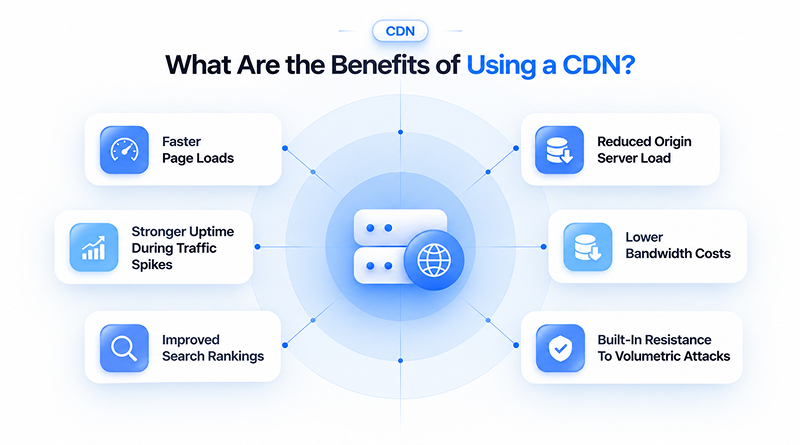
Faster page loads remain a CDN’s most visible benefit, but its value reaches well beyond that. The impact spreads across server load, uptime, cost, and even search visibility.
Performance Benefits
How a CDN Accelerates Your Website
Faster Page Loads
An edge server is closer to the visitor than the origin ever could be, so pages render sooner simply because the data has less distance to cover.
Performance Boost
Reduced Server Load
Cached copies handle the bulk of incoming traffic on their own. The origin server steps in only when something actually requires it, not for every single request.
Resource Optimization
Spike Resistance
Traffic surges rarely hit one server directly; they get absorbed across a wider network of edge locations, which is why the website holds steady instead of buckling under sudden demand.
High Availability
Lower Bandwidth Costs
Every request a cache serves is one the origin server can avoid handling. Fewer direct requests translate into lower outbound bandwidth on the hosting bill.
Cost Efficiency
Improved Search Rankings
Page speed carries real weight in how search engines rank a website, and a CDN’s contribution to load time can shift that ranking over time.
SEO Advantage
Attack Resistance
A single server is far easier to overwhelm than traffic spread across multiple edge locations, giving a CDN a natural edge against basic denial-of-service attempts.
Network Security
What Are the Benefits of Using a WAF?
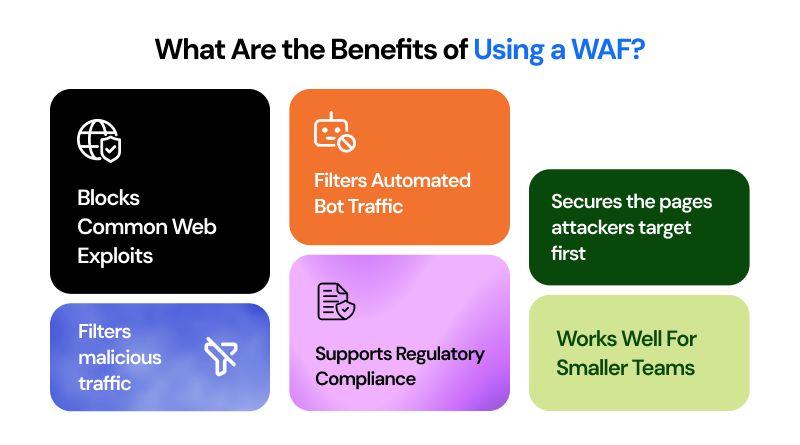
A WAF rarely shows its value through everyday metrics the way a CDN does. The value of a WAF becomes evident when it successfully blocks a malicious request.
Security Benefits
How a WAF Protects Your Application
Blocks Common Exploits
Rule-based detection identifies attack patterns related to SQL injection, cross-site scripting, and other known methods of exploitation before they can affect the application code.
Threat Prevention
Filters Automated Bots
A behavioral layer picks out request patterns tied to scraping, credential stuffing, and other automated abuse and blocks them without slowing down real visitors.
Bot Mitigation
Secures Target Pages
Checkout pages, login forms, and account dashboards hold the data attackers target most. The WAF filters that traffic closely and blocks interception or tampering attempts before they succeed.
Critical Asset Defense
Edge Traffic Filtering
Bots and harmful requests are identified and blocked at the network edge before they ever reach the server, keeping resources available for real visitors instead of being contested by fake ones.
Resource Preservation
Regulatory Compliance
Businesses handling payment information or personal data often need to show active protection measures in place, and a WAF forms a core part of meeting that requirement.
Standard Alignment
Ideal For Lean Teams
A properly configured WAF gives a lean team enterprise-level protection, which matters most for any WAF for small businesses set up and running without a dedicated security staff.
Accessibility
WAF vs. CDN: What’s the Difference?
People often treat CDN vs. WAF as an either-or choice, though it really hinges on what each one is built to protect. A CDN shapes how fast content reaches a visitor, while a WAF decides whether a request deserves to reach the server in the first place.
Why Do Providers Bundle CDN and WAF?
Speed and security aren’t separate problems. A slow website is easier to attack, and an attacked website gets slower. Malicious traffic and real visitors end up competing for the same resources. Pairing WAF and CDN coverage under a single provider closes that gap instead of leaving two disconnected systems for a team to manage separately.
A few providers already build this pairing into their platform:
Cloudflare routes traffic through its global edge network first, applying WAF rules and DDoS filtering at the same layer where caching happens, so security and performance checks run as one pass rather than two.
Akamai built its name on enterprise-scale content delivery, later extending that same edge infrastructure to carry application security rules, giving large organizations a single control plane for both functions.
Sucuri leans further toward the security side of that pairing, offering CDN performance as a complement to its core malware scanning and firewall services. Teams already running a separate CDN for performance often list Sucuri among practical WAF alternatives built specifically to cover the security side.
When Should You Use a CDN, WAF, or Both?
A website’s daily risks determine the appropriate configuration, not the most comprehensive combination presented on a features page.
A content-heavy website with a global audience and nothing sensitive to protect can run comfortably on a CDN by itself. A website handling logins, payment details, or an SSL-secured checkout needs WAF coverage regardless of how much traffic it gets, since the risk here comes down to intent rather than scale. Most e-commerce stores, membership platforms, and business websites processing customer data benefit from a CDN WAF combination from the start, particularly when running on a cloud VPS environment without a dedicated security team monitoring traffic manually.
How Does MilesWeb Support Website Performance and Security?
MilesWeb brings CDN-level performance and WAF-level protection into the same hosting environment instead of treating them as optional extras. Every plan includes a free SSL certificate, firewall coverage, and DDoS protection built to catch malicious traffic before it ever reaches the server.
Performance gets equal attention. Hosting built on a LiteSpeed server keeps page delivery fast by default, while NVMe SSD storage and dedicated resources on VPS plans reduce the load times a CDN typically exists to fix. Anyone testing infrastructure before committing can start with a free cloud VPS trial. Businesses exploring newer ways to launch a website can also build one through MilesWeb’s Vibe coding-powered AI builder, which runs on that same secure, high-performance layer.
Closing Insights
A CDN and a WAF answer two different questions a website faces constantly: how fast can content reach a visitor and should this particular request be trusted at all? Treating either one as a substitute for the other leaves part of the equation exposed, no matter how strong the remaining piece looks.
For most growing websites, running both together earns its place fast, since the two systems reinforce each other more than they compete for the same budget line. Most teams add protection only after an incident forces the question. Hosting that plans for both from the start scales further, with far fewer surprises along the way.
Frequently Asked Questions
1. Does a CDN protect against DDoS?
Partly. Spreading traffic across edge servers absorbs a lot of basic flooding attempts on its own, since no single server takes the full hit. A CDN wasn’t built to inspect requests for malicious intent; that responsibility belongs to a WAF or a dedicated DDoS mitigation layer.
2. Is Cloudflare a CDN or a WAF?
Cloudflare does not separate the two functions. A request reaches their edge network, is checked against WAF rules, and is served from the cache if a cached copy exists. Both processes occur within the same network layer rather than as distinct systems.
3. Can I use a WAF without a CDN?
Yes. A number of WAF products work standalone. They filter traffic at the application layer and don’t touch caching or content delivery at all. The security function works on its own, separate from any CDN.
4. Does CDN improve website security?
Only around the edges. Spreading content across edge servers takes pressure off the origin and makes basic flooding attacks harder to execute, since there’s no single point to overwhelm. What it doesn’t do is look inside a request and decide whether it’s malicious. A WAF handles that, not a CDN.