 Jyoti Prasad
KVM and QEMU are two major open-source complementary technologies for the high performance of websites and applications. KVM is the first Linux kernel model that is used in multiple virtual machines or VPS. It transforms the entire Linux OS into a functional hypervisor. QEMU is a machine emulator that emulates CPUs and hardware devices, allowing you to run software for one architecture on another, making it invaluable for cross-platform development and testing. The comprehensive guide of KVM vs. QEMU discusses the nitty-gritty about it.
When combined, KVM accelerates CPU power while QEMU manages device emulation, functioning as a Type-1 hypervisor. In this, KVM converts the Linux kernel into a bare-metal hypervisor, while QEMU provides the necessary user-space tools and peripheral emulation.
To put it simply, KVM is a Linux kernel module that enables virtualization, and QEMU is a full-system emulator that can mimic several different CPU architectures. So, KVM is the virtualization, and QEMU is the emulation.
This article will clarify how KVM and QEMU work independently and in conjunction to deliver virtualization on Linux hosting servers, as well as evaluate their speed, performance, and utilization in the real world. Ultimately, this article aims to help you understand the circumstances in which each technology is applicable and how its integration provides the most effective virtualization on Linux.
Table Of Content
What is KVM? The Kernel Module Accelerator
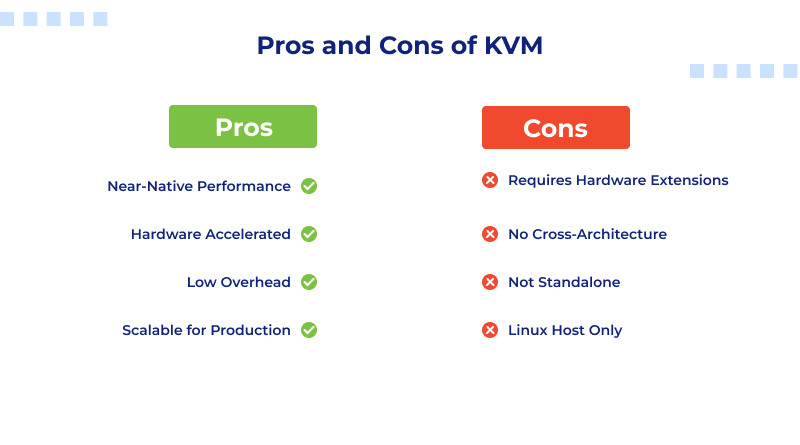
KVM’s full form is Kernel-based Virtual Machine, embedded in the Linux OS kernel, offering near-native performance and low overhead. While QEMU specializes in software-based full-system emulation, KVM integrates with the Linux kernel to provide hardware-assisted virtualization, enabling VMs to run at near-native speeds.
KVM is not a standalone software. KVM is a Linux kernel module that allows the Linux operating system to become a Type 1 (bare-metal) hypervisor. This means KVM allows Linux to handle and provide multiple isolated virtual machines (VMs) that run as if they are on a physical computer and run them directly on the hardware.
So, if you have asked yourself, “Is KVM a hypervisor?” The answer is yes. KVM virtualizes Linux and transforms it from a general-purpose operating system to a fully functional, enterprise-grade, bare-metal hypervisor.
How KVM Works?
KVM takes advantage of hardware virtualization extensions that are built into every modern processor. This includes Intel VT-x for Intel processors and AMD-V for AMD processors. These features allow the virtual machines to run instructions that use the CPU directly, eliminating the time-consuming software emulation.
Here’s what happens behind the scenes:
- Enhanced by KVM, the Linux VPS kernel takes care of virtual machine memory, I/O, and process scheduling.
- The guest operating system is executed in an isolated environment, and when executing privileged CPU instructions, the host CPU handles them directly.
- Latency and performance are exponentially better with hardware-assisted virtualization over pure emulation.
Similar Read: Difference in between KVM and OpenVZ Virtualization
Near-Native KVM Performance
KVM virtual machines are built on actual CPU hardware, so performance is near-native. This explains the use of KVM in:
- Cloud-hosting platforms, such as OpenStack, Proxmox, and VPS hosting.
- Enterprise virtualization solutions with high levels of scalability and minimal overhead.
- Developers require dependable, rapid, and performant Linux virtual machines configured for testing and deployment.
- To check for KVM support, use the following command on Linux:
egrep -c '(vmx|svm)' /proc/cpuinfo- If the answer is greater than zero, your processor is equipped with hardware-assisted virtualization.
KVM Advantages
- Full virtualization: Each VM has its own isolated kernel, which guarantees complete environment separation.
- High performance: Leverages hardware-assisted virtualization (Intel VT-x and AMD-V) for near-native performance.
- Strong security: Kernel-level isolation mitigates risks associated with cross-VM interference and breaches.
- Broad OS compatibility: Runs major operating systems, including Linux, Windows, and BSD.
KVM Disdvantages
- Higher resource requirements: Needs more CPU and memory than lightweight container solutions.
- Complex setup: For beginners without a control panel, configuration and management can be truly daunting.
- Limited flexibility for quick container deployments: For lightweight applications, it’s not as fast as container-centric systems like LXC or Docker container.
What is QEMU? Quick Emulator
Among the versatile, powerful tools for Linux virtualization, QEMU is certainly one of them. QEMU’s full form is “Quick Emulator,” which simulates complex systems, like network interfaces. Additionally, it offers a sandboxed environment that acts like a real physical machine.
Primarily, QEMU is a full system emulator. When it runs by itself, without any KVM, it works as a Type 2 hypervisor, which means it runs over the host operating system instead of hardware. In this situation, QEMU translates each instruction of the guest operating system (the OS inside the virtual machine) into host CPU executable instructions.
What is QEMU Used For?
Put differently, QEMU is a universal software translator of any CPU instruction set, be it x86, ARM, PowerPC, or RISC-V. This feature allows it, for example, to emulate an ARM based Android system on an Intel or AMD computer and even to experiment with different architectures for embedded development.
How QEMU Works? (Simplified)
QEMU has a special internal component called the Tiny Code Generator (TCG). This component enables QEMU to dynamically translate machine code instructions of different architectures for different machines in real time. In a QEMU emulator without hardware acceleration, the software will be sluggish, with the CPU instructions being modified software-wise and not being executed as intended.
QEMU Advantages
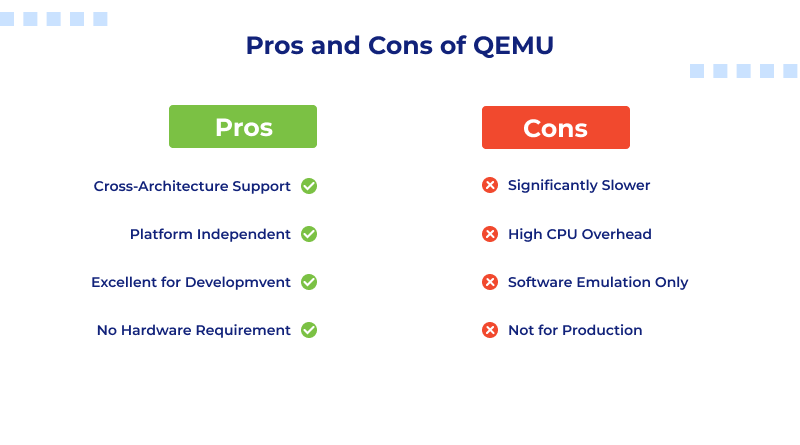
- Cross-architecture support: Run guest operating systems designed for entirely different CPU types.
- Platform independence: Works across multiple host systems (Linux, macOS, and Windows).
- Ideal for developers and testers: Perfect for debugging kernels, firmware, or bootloaders without dedicated hardware.
QEMU Disadvantages
- Performance bottlenecks: Without KVM or another accelerator, QEMU operates purely in software mode, making it much slower compared to hardware-assisted virtualization.
- Higher CPU overhead: The translation process consumes more system resources.
- Less suitable for production: Best used for testing, education, or emulation purposes, not for high-performance workloads.
What is QEMU in Linux?
In Linux, QEMU (Quick Emulator) is a versatile, open-source tool that functions as both a machine emulator and a virtualizer. It facilitates running operating systems and applications designed for one hardware platform on a completely different one.
In the Linux ecosystem, QEMU and KVM are mostly used together to provide high-performance virtualization. While QEMU handles emulation of hardware devices such as disks and network interfaces, KVM allows the guest operating system to execute CPU instructions directly on the host’s physical processor.
The Crucial Partnership: KVM + QEMU (The Reality)
In real-world Linux environments, KVM and QEMU almost always work together—forming a powerful virtualization stack that balances performance with flexibility. Understanding how they complement each other is key to appreciating why modern Linux virtualization is so efficient.
The Synergy Between KVM and QEMU
Think of KVM and QEMU as two halves of a single system:
KVM provides the speed and hardware acceleration, allowing CPU instructions from the guest OS to run directly on the host’s processor.
QEMU provides the emulation layer, handling non-CPU components such as network interfaces, storage controllers, USB devices, and display adapters.
Even more simply:
- KVM = Drives
- QEMU = Body and Drives
They provide quick and rich virtualization together.
How It Works in Practice?
When a virtual machine runs on a KVM QEMU virtualization setup:
- QEMU looks after and runs the virtual hardware environment where the devices and BIOS and the memory and I/O and more are carved out and managed.
- Then KVM comes to help and takes the CPU command to execute off and hardware virtualizes the command to the real CPU to execute it and convert it to the pass-through the CPU adapter.
Hence, the guest operating system runs on the machine virtually and can work on the machine at high speed and real machine speed as if it were physically installed on the machine. QEMU will give this pass-through and device emulation.
Both provide what the old emulation lacks, and that is speed. The old emulation is losing compatibility and flexibility.
Difference Between KVM and QEMU
Useful Read: KVM Alternatives
The difference between KVM and QEMU is that KVM is a virtualization software, whereas QEMU is an emulation software. The below table explains the KVM vs QEMU difference.
| Feature | KVM (Used with QEMU) | Pure QEMU (Emulation Mode) |
| Role | Virtualization Accelerator | Full-System Emulator |
| Performance | Near-native speed thanks to hardware-assisted virtualization | Very slow due to software-based translation |
| Hypervisor Type | Type 1 Hypervisor (Linux Kernel module) | Type 2 Hypervisor (Runs as user-space application) |
| Hardware Required | Requires Intel VT-x or AMD-V extensions | No specific hardware requirement |
| Architecture Support | Runs guest OS on the same architecture as the host | Can emulate different CPU architectures (e.g., ARM on x86) |
| Management Tools | Managed through libvirt, virsh, or virt-manager | Operated via command line or basic scripts |
| Integration with Linux | Built into the Linux kernel for seamless performance | Independent of the kernel; runs entirely in user space |
| Key Benefit | Exceptional KVM vs QEMU performance and speed | Unmatched cross-architecture flexibility |
| Ideal Use Case | Production servers, VPS hosting, and cloud environments | Testing, debugging, and cross-platform development |
Conclusion
When deciding between KVM and QEMU, there is no need for choosing one over the other, and this is the case because they complement one another. Each offers distinct, yet complementary, functionalities in the virtualization hierarchy.
KVM is the preferred option if your primary concern is performance and operational productivity. This is because KVM, when coupled with QEMU, utilizes virtualization and is guaranteed near-native speeds, along with consistent application, server, and cloud environment performance. KVM outperforms QEMU with respect to real-world performance assessments because KVM is integrated into the Linux kernel.
If development, testing, and cross-architecture emulation are your primary concerns, your best option is pure QEMU. It is the best option because it enables developers to run dissimilar CPU-architecture operating systems (e.g., ARM and x86) and is also versatile. As a result, it is highly suited for development pertaining to embedded systems, operating systems, and debug environments.
Ultimately, KVM and QEMU are not competitors but collaborators. KVM delivers speed and hardware-level performance, while QEMU offers pliability and transportability. They constitute an exceptional, open-source virtualization pair that provides outstanding performance along with extensive interoperability.
FAQs
1. Does QEMU have the ability to run without KVM? How is the performance then?
Certainly, QEMU can operate without KVM, but only at the cost of using its Tiny Code Generator to perform software-based instruction translation emulation for any given CPU framework. Ultimately, performance suffers with this approach by at least an order of magnitude, meaning the output takes 10 times longer than the output would have taken using native execution. Without hardware acceleration, pure QEMU is best suited for testing and development, not production workloads.
2. What is the reason KVM is faster than pure QEMU emulation?
KVM is faster than pure QEMU because it leverages hardware-assisted virtualization through Intel VT-x or AMD-V extensions. These CPU features allow guest OS instructions to run directly on the host processor, bypassing the need for software translation. The result is near-native performance, making KVM-accelerated QEMU virtualization ideal for server environments and high-performance computing.
3. Does QEMU have the ability to act as a hypervisor? How does this apply to KVM?
KVM, as an integral part of the Linux kernel, operates as a hypervisor or, more specifically, a Type 1 hypervisor. QEMU, on the other hand, is a Type 2 hypervisor. However, when QEMU is run with KVM, it is simply a device emulator, merging the flexibility of QEMU with the speed of KVM through bare-metal performance.
4. When is QEMU’s pure emulation mode (without KVM) most useful?
Pure QEMU emulation modes shine in cross-architecture testing and debugging scenarios. Developers frequently utilize it to run an ARM OS on an x86 machine, debug firmware, or test bootloaders without the need for physical hardware. Its detailed control over processor states and simulated devices makes it a popular option for embedded systems development and low-level OS exploration, albeit at a reduced performance.