 Jyoti Prasad
Building or using AI tools to develop anything you want is a great experience. You generate code, debug apps, or ask an AI helper to resolve an issue during your session; all of a sudden, the session ends abruptly.
“Your current period quota limit has been exceeded. Please try later.”
The above message is common when you are working with AI. You might have used up your daily usage allowance, or your API has reached its quota, or the provider or service has a temporary outage or interruption.
All of a sudden, you cannot continue working on your project because your workflow has been interrupted. Unfortunately, as more and more developers become reliant on multiple AI models and coding assistants, these incidents are becoming more prevalent. Developers are paying for subscriptions like Claude, ChatGPT, Gemini, etc., and still run into issues with usage caps or rate limits.
9router was created specifically to solve this exact problem.
Instead of being reliant on a single AI provider, 9router is an intelligent local routing layer that connects your AI tools to multiple AI tool models from different vendors. If one AI provider runs out of credits or you reach a usage cap, you are automatically shifted to the next best available option for continuing your work.
How 9router Works
9router is a unique approach to using artificial intelligence. It focuses on maximizing usage for the services that you already pay for. The goal of 9router is to create a fuller experience when using AI so that workflows remain successful, even when one provider reaches its maximum capacity.
This MilesWeb’s guide mentions 9router, an explanation of how the routing architecture works, a list of AI coding tools that support 9router, how RTK Token compression helps save you money, and whether or not 9router is a viable alternative to services like OpenRouter or direct API integrations (for instance, via REST) for AI-related coding endeavors.
So without any further ado, let’s get started!
Table Of Content
What is 9router?
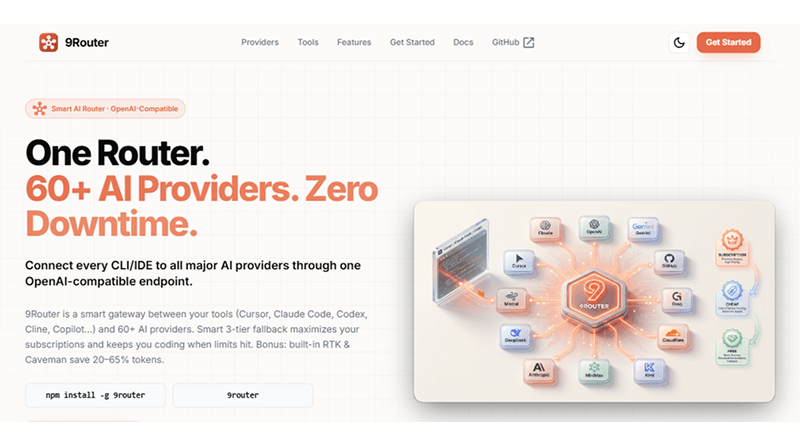
9router is an open-source proxy for artificial intelligence to access different models that developers use to code. After hitting the limit, 9 routers connect to multiple model providers via a single local endpoint instead of manually switching between different APIs, subscriptions, or providers. It automatically does this shifting for the user through an intelligent back-end routing mechanism.
In simple terms, you can compare 9router as the intelligent traffic cop for your AI’s requests. Just like a busy airport, where planes can use different runways depending on availability, congestion, or traffic. Similarly, 9router handles requests from coding tools such as Claude Code, Cline, Roo Code, etc., and routes them to the corresponding service provider based on availability, cost, quotas, etc.
Thus, 9router addresses a fundamental frustration in modern-day AI development: provider lock-in. If a developer has been using an individual provider’s service to fulfill requests and either receives no more credits or has exhausted their credit quota, that developer can now route their requests to multiple providers using this route layer, which calculates the most efficient route and delivers the response back to the developer.
Related Read: Best ChatGPT Alternatives
⚙️ 9router’s Architecture and Integration with AI Tools
9router has been developed with simplicity in mind.
After installing 9router, it is accessible locally on your machine, exposing an open-source, OpenAI-compliant API on localhost. Instead of reaching out to each service provider for requests, coding tools directly connect and send requests to 9router’s API.
Claud, Cline, Continue, and Roo Code (among others) send requests to 9router; the routing engine then determines the best service provider based on statistics and returns the response received from the service provider.
Because the 9router sits in between your application and your provider, it is responsible for managing the provider you use, failovers with the provider, handling quotas, and optimizing the use of other AI providers. All of these tasks are accomplished without any manual intervention or disruption in your daily workflow.
📊 The 9router Dashboard
Although the routing process is fully automated, the 9router has a dashboard feature that gives visibility and control of how you are using AI.
The dashboard provides developers with the ability to:
👀See who your AI providers are and their status.
📈Track your token usage and how many requests you are making.
🎯Set the routing priority of AI providers.
💳Set rules for AI provider subscriptions and pay-per-token providers.
⚙️Enable/disable certain AI models.
🛡️Review how your applications behave if your provider resources run out of quota.
📊Get usage statistics and performance insights for your AI.
Rather than having multiple dashboards for the different providers, you have one central dashboard that allows you to see how each AI request is routed and what resources were consumed.
🌍 Who has developed 9router?
The project is being developed and supported by the MIT License, which helps developers to view source code, make improvements, and self-host the software with no licensing fees. The ongoing development of 9router is tracked on the 9router GitHub page, where contributors continuously add new integrations, improve routes, and optimize features for AI providers.
The objective is quite simple: allow developers to have a dependable method of using multiple AI service providers via one unified interface while minimizing disruptions to their workflow, lowering expenses, and making the management of their AI infrastructure easier.
The 3 Tier Fallback System: How 9router Never Allows Your Session To Fall?
Initially, the majority of AI systems used a single vendor; thus, when that vendor hits its rate limit or reaches its usage cap, your entire workflow is disrupted until that vendor is back up and running.
9router takes a different approach to maintaining the active sessions of AI developers.
Instead of relying solely upon one vendor, it has created an auto-routing multi-tiered routing strategy that automatically shifts between AI vendors based on who’s currently available. This provides developers with a safety net that allows them to continue with their AI coding sessions even when one or more AI providers are down.
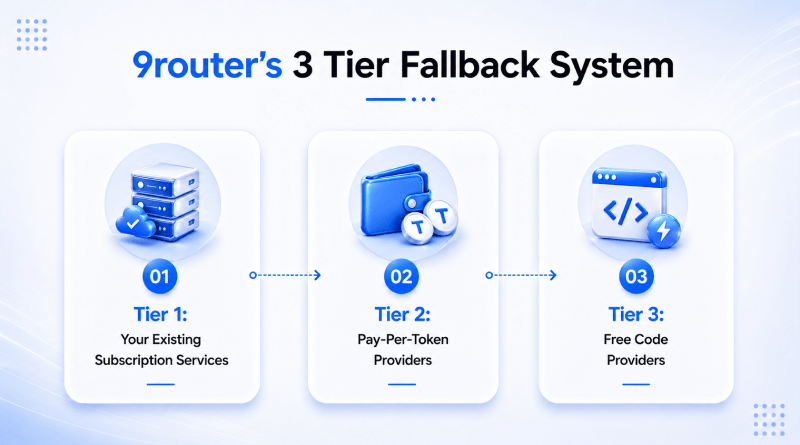
Each layer of the three-tier fallback system is designed to ensure continuity, even if all primary AI providers become unavailable.
Tier 1: Your Existing Subscription Services
The first tier of the fallback system is to attempt to always route requests through the vendors to whom you currently have subscriptions. If you are currently using an AI service that you are subscribed to, such as Claude, ChatGPT, Gemini, or any of the other supported AI services, all of your requests will be routed through that subscription first. This provides the maximum power of your current subscription before it routes any of your requests to an alternate AI vendor.
Similar Read: Claude vs ChatGPT: Best AI Chatbots
One other benefit you will enjoy is the convenience of authentication. Most of the supported providers allow you to connect using an OAuth login rather than generating and managing API keys manually. After you’ve authenticated, 9router connects directly to your subscription allowances to enable the application of the AI tool.
Thus, you can continue using the premium AI tools while 9router monitors usage in the background and simultaneously prepares other routes when limits are reached.
Tier 2: Pay-Per-Token Providers
Eventually, all subscriptions hit a limit, and you receive messages saying, “Try again in 21 hours,” or “We are out of quota,” etc. Here, 9router automatically upgrades your requests to the next level up when the providers respond in this way.
The second level consists of low-cost pay-per-token providers.
These providers do not require a complete subscription; you only pay as per the token used. Depending on your provider and model used, you could be paying anywhere between approximately $0.20 and $0.60 per million tokens used.
If you are a developer, it’s a great way to bridge the gap between premium subscriptions and a complete loss of service. You will not have to wait for a reset of your quota to proceed, and the only costs incurred will be small, usage-based.
Tier 3: Free Code Providers
In the rare case where all subscription quotas or low-cost paid options have been reached (or exhausted), these Free Code providers serve as a backup option. Although generally free-code providers may not perform optimally (like non-free-code alternatives), they can still maintain operations for coding sessions, debugging, and typical AI workflows.
This fallback concept is part of what makes using 9router attractive to developers who use AI tools for extended periods of time and want to avoid being stopped and having their requests transferred automatically to other available routes.
Be aware that the availability of any free tiers fluctuates frequently based on providers’ changing status. For example, several popular existing free providers (such as software from iFlow, Qwen, and Gemini CLI) are no longer offering the option to access free tiers; meanwhile, there are other new free providers launched willing to offer free sessions.
For this reason, users should regularly interact with 9router’s official README to look for the latest information on currently available free providers.
– Importance of the Three-Tier Model
While the real benefit of 9router is its capability of automatically switching between providers, it also offers access to different service providers.
Most of the software developers do not want to stop coding to change API keys, create additional configurations, or resolve quota errors. 9router’s three-tiered fallback system continuously finds the next available route for AI requests and removes the development process friction.
It creates a more efficient workflow and ensures that temporary limits, outages, or exhausted quotas do not interrupt productive work.
Which AI Coding Tools Are Compatible with 9router?
As 9router is gaining momentum within the software development community, it is also exposing a local endpoint that is compatible with OpenAI. Therefore, modern AI-supported coding tools can now effortlessly connect to 9router while requiring minimal configuration changes. After connecting the AI-supported code tool to 9router, it sends requests to 9router, which, as a result, selects a provider using routing and failover mechanisms and manages quotas in the background.
So while the coding assistant works just as it always has before, 9router handles managing access to multiple AI providers behind the scenes.
AI Coding Tools Compatible With 9router
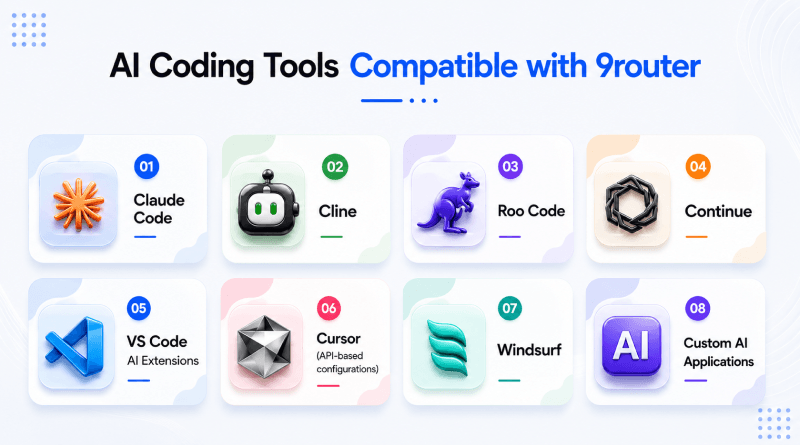
| Tool | Use Case | 9router Compatibility | Custom Endpoint Support | Why Developers Use It With 9router? |
|---|---|---|---|---|
| Claude Code | AI-powered coding, debugging, refactoring, and codebase analysis | ✓ Yes | ✓ Yes | Continue coding even after Claude subscription limits are reached by automatically switching to alternative providers. |
| Cline | Autonomous coding assistant for VS Code | ✓ Yes | ✓ Yes | Access multiple AI providers through a single configuration while benefiting from automatic fallback. |
| Roo Code | Agent-based software development and automation | ✓ Yes | ✓ Yes | Prevent workflow interruptions when provider quotas or rate limits are exhausted. |
| Continue | Open-source AI coding assistant for IDEs | ✓ Yes | ✓ Yes | Connect local development environments to multiple AI models without manually switching APIs. |
| VS Code AI Extensions | Code generation, explanations, and debugging | ✓ Generally Yes | Depends on the extension | Many extensions support OpenAI-compatible endpoints, making them compatible with 9router’s routing layer. |
| Cursor (API-based configurations) | AI-assisted coding and codebase understanding | Partial to Full* | Depends on configuration | The ability to leverage 9router in workflows that allow custom API endpoint configuration. |
| Windsurf | AI software engineering environment | Partial to Full* | Depends on configuration | Compatibility depends on whether custom model endpoints can be configured. |
| Custom AI Applications | Internal tools and developer-built AI systems | ✓ Yes | ✓ Yes | Centralize provider management and gain automatic failover without changing application logic. |
* Note: 9router’s compatibility varies based on provider settings, versions, and custom endpoint options. It is important to check the 9router documentation every time you use it.
Do all AI tools work with 9router?
Not automatically.
Most tools that allow for integrations using custom API endpoints or are OpenAI-compliant APIs are reasonably easy to configure to 9router. However, there are certain proprietary tools that have limitations preventing them from working with custom routed configurations.
As support from 9router continues to grow, the most reliable location for accurate compatibility is the official 9router documentation and GitHub repository, where you get the latest integrations and supported workflows.
Who Benefits Most From 9router?
9router is beneficial for developers relying on several different AI coding tools and encountering issues due to request limitations permitted by the providers. It works best for users switching between multiple providers frequently. Developers get a dependable AI assistance throughout the day to develop, debug, refactor code, or develop in an agent-based development framework. Thus, if they are using all of these AI tools, the routing layer of 9router reduces the frequency of interruptions and provider switching.
However, 9router isn’t needed by all developers who use AI tools. Developers who use a single provider (or a limited number of providers) or who prefer a limited infrastructure with tightly controlled parameters may find 9router overwhelming. As 9router creates a type of local proxy and optional orchestration of the providers each developer uses, it is highly recommended for developers requiring multi-provider resiliency or cost optimization.
Who Should Use 9router?
| User Type | Why It Fits | Typical Scenario |
|---|---|---|
| Heavy AI-Assisted Developers | Prevents workflow interruption from quota exhaustion | Daily coding with Claude Code, Cline, or Roo Code |
| Multi-Provider Users | Centralizes multiple AI subscriptions and APIs | Using Claude + OpenAI + Gemini in parallel workflows |
| Startup Engineering Teams | Reduces AI cost spikes via intelligent routing | Shared development environments with high token usage |
| Power Users Building AI Tools | Needs OpenAI-compatible routing layer locally | Building internal tools or AI-powered apps |
| Cost-Optimized Developers | Automatically shifts to cheaper providers | Managing high token usage without overspending |
Who Should Skip 9router?
| User Type | Reason to Skip | Better Alternative |
|---|---|---|
| Casual AI Users | Rarely hits limits or quotas | Direct use of ChatGPT or Claude apps |
| Single-Provider Workflows | No need for routing complexity | Direct API or native tool integration |
| Non-Technical Users | Requires local setup and configuration | Managed AI platforms with UI-based access |
| Low-Frequency Developers | Benefits don’t justify setup overhead | Lightweight browser-based AI tools |
| Strict Enterprise Environments | May restrict proxy or CA installation | Approved enterprise AI gateways |
Quick Takeaway
In an environment where AI is used consistently (i.e., as a part of the build process instead of as a separate occurrence), 9router becomes “infrastructure” that enables developers to have uninterrupted development across multiple providers, tools, and methodologies.
9router vs. OpenRouter vs. Direct API: Which is the Best 9router Alternative?
Alternate methods of routing, such as OpenRouter and API integrations, have different routing structure approaches. Knowing the difference helps to select the best route based on control needs, budgeting constraints, and infrastructure complexities.
The main differences in the routing approaches of the products are how and where intelligence/control solutions reside. 9router operates on your local computer and focuses on building workflows with various AI providers, using fallback to AI providers whenever there is either an outage or limit restrictions.
OpenRouter, on the other hand, is convenient and easy to use. However, since all routing is done through cloud-based services, you have less control and visibility into local routing functions and AI providers. Using direct APIs is even more simple, but it does not have as much flexibility when either an outage occurs or you hit a usage limit.
Developers can choose the solution that best aligns with their priorities—greater control and AI provider fallback with 9router, quick access and convenience with OpenRouter, or a simpler setup through a direct API.
| Dimension | 9router | OpenRouter | Direct API (Claude/OpenAI/Gemini) |
|---|---|---|---|
| Architecture | Local Proxy Local proxy layer that routes requests between multiple providers on your machine |
Cloud Router Cloud-based API aggregator that routes requests through its servers |
Direct Connection Direct connection from application to a single AI provider |
| Cost Model | Uses your existing subscriptions first, then low-cost tokens, then free providers | Pay-per-token with platform markup added to underlying model cost | Pay-per-token or subscription depending on provider |
| Data Privacy | High Control Traffic stays local unless routed externally |
Cloud-Based Requests pass through OpenRouter’s cloud infrastructure |
Provider-Dependent Depends entirely on provider’s data handling policies |
| Auto-Fallback | Built-in 3-tier automatic fallback system | Limited fallback based on models available in OpenRouter ecosystem | Manual switching required |
| RTK Compression | Supports RTK token compression to reduce token usage and cost | Not a core feature | Not available unless implemented by developer |
| Setup Time | Moderate Local installation + provider linking via OAuth/API |
Low Simple API key setup |
Low → Moderate Low for single provider, increases with multi-provider setups |
| Best For | Multi-Provider Workflows Developers using multiple AI tools and wanting uninterrupted workflows |
Quick Access Developers who want quick multi-model access without local setup |
Single Ecosystem Simple applications tied to one provider ecosystem |
| Licensing / Model | MIT-licensed open-source project | Proprietary SaaS platform | Proprietary provider APIs |
Wrapping Up
As AI development tools continue to develop, the issues of rate limits, quota exhaustions, and provider availability become more disruptive for developers.
9router is more than just another addition to the integration layer; it fundamentally reorganizes how AI request responses are structured. It does this by creating a single routing system to integrate providers using subscriptions, low-cost token services, and free fallback models into one system. Together, these tiers ensure uninterrupted workflow continuity, even when you reach the usage limits of your AI provider.
Unlike any other existing alternatives, such as OpenRouter or using direct APIs, the primary value of 9router is its local control and resiliency. Therefore, 9router is the best infrastructure built for AI-heavy development workflows instead of an independent tool. It takes care of all the complexities of a backend, and all coding sessions occur without interruption, regardless of any individual provider’s availability.
FAQs
1. Is 9router completely free of charge?
Yes, 9router is open-source software developed under the MIT license and doesn’t charge a fee for the platform use. You will be charged by the individual AI provider you choose to use, depending on if you select a subscription service or pay per token through an API.
2. Does 9router work with Claude Code?
Yes. You can set up Claude Code to call the localhost of 9router by accessing the URL http://localhost:20128/v1. After you configure it, 9router manages all routing logic and routes to all connected providers, distributing the requests and switching to another provider.
3. Can my use of 9router be considered safe?
With 9router, you can create a local root certificate authority (CA) to secure a connection between tools and guides using a cloud-based matchmaking service. You may or may not need a cloud-based security feature (such as an API). While this type of configuration is generally safe, using Docker to run 9router is advisable for essential network security tasks. Docker usage provides you the option to disable the cloud sync and review or analyze the CA before using it in a production environment. The best tip is to refer to the official 9router documentation for security documentation before using it in a production environment.
4. If a free provider is removed, what happens?
If a provider has an active service but their free tier is no longer available, the router will automatically route traffic to the next available provider in the fallback chain based on configuration (historically, iFlow and Qwen had their free tiers removed in 2026, and users compared to it did not experience any outages due to auto-fallback). The list of available providers is always evolving; therefore, it is important to update the most current version of this list in the README file provided by the router creator.
5. How is 9router different from OpenRouter?
9router is a local routing proxy that functions as an application on your computer. It gives more control over your data and adds features such as RTK token compression and multilayer fallbacks. OpenRouter, on the other hand, is a hosted SaaS where requests are routed through provider infrastructure and carry a slight premium per token used. Essentially, OpenRouter operates as a “conveniently managed cloud solution” while providing the user total “local control and scalability.”