
 Gaurav Bodhare
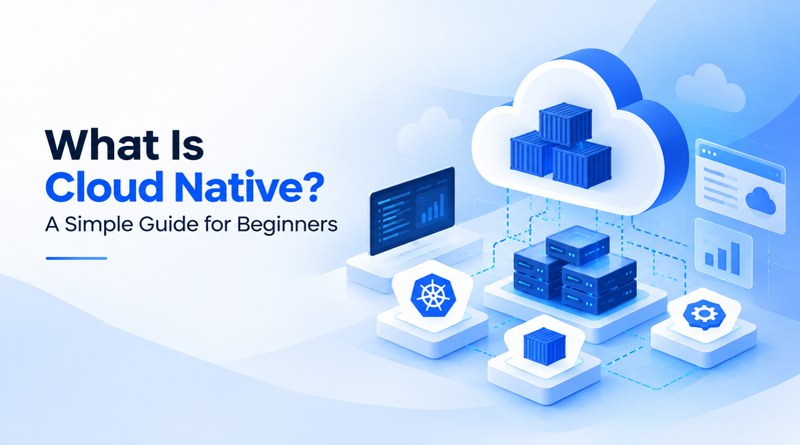
Software plays a central role in how organizations serve customers, while expectations for speed, availability, and reliability keep climbing. Technical teams respond by rethinking how applications are designed, tested, and released. One approach has earned wide adoption for this purpose, and it is known as cloud native. The model powers many of the banking apps, streaming services, and online marketplaces that people rely on daily.
Every cloud native journey starts with infrastructure that adjusts to demand, and cloud hosting provides the flexible resources that each service needs. In this blog, beginners will find the key concepts, the main benefits, and the first steps toward adopting cloud native.
Table Of Content
What is cloud native?
Cloud native is a software approach that treats the cloud as the home of an application from the first design decision. Cloud native computing divides a product into small components, places each service in a container, and lets automation run the full set. Newcomers often ask what the Cloud Native Computing Foundation is. The CNCF is a vendor-neutral organization under the Linux Foundation, founded in 2015, and it hosts projects such as Kubernetes and Prometheus. Its definition places scalability, resilience, and observability at the center of the model. “Cloud native” therefore describes a working style as well as a toolset.
How does cloud native work?
Cloud native architecture splits an application into microservices, and each microservice exposes an API for the others to call. Developers package every microservice as a Docker image, and the image runs as a container on any server in the cluster. Kubernetes keeps a running count of containers against what the team asked for. Ask for four copies of a payment service, and it holds at four, even when a server drops out midday.
The CI/CD pipeline handles the other half. A commit triggers the build, the tests run, and if they pass, the release goes live in a small portion of the cluster first. Monitoring tools watch response times and error rates the whole time. When a container crashes, Kubernetes starts a replacement and sends traffic only to the healthy instances. Because each release stays small, teams can release updates weekly or even daily.
Related Read : Top Kubernetes Hosting Providers
What are the key features of cloud native technology?
Six features define cloud native technology, and each one supports the others. Applications that simply sit on cloud servers lack most of them, which sets genuine cloud native systems apart.
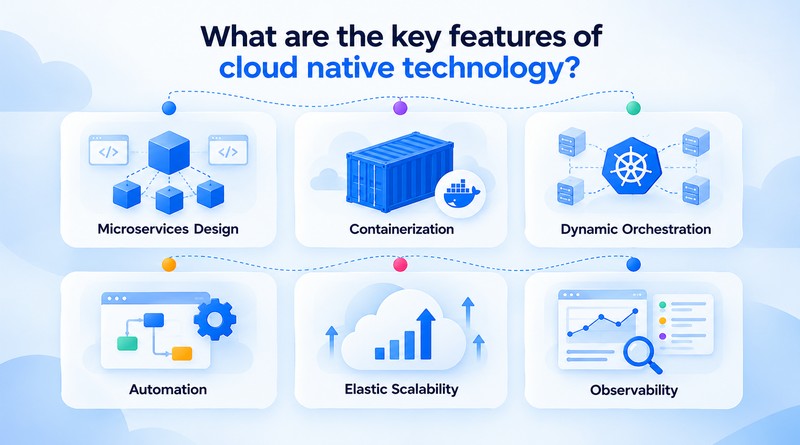
Microservices Design
A microservice covers one business function, for instance, payments, search, or notifications. Teams change, test, and release that function while every other service keeps running. Smaller code areas also keep reviews short and focused.
Containerization
A container bundles code, libraries, and configuration into a single package. That package behaves the same on a laptop, a test server, and a production cluster. Environment mismatches therefore stop delaying releases.
Dynamic Orchestration
Kubernetes and similar platforms place workloads on available servers and share traffic across them. They restart broken components and roll out updates in stages. Operators describe the desired state once, and the platform holds it.
Automation
Declarative files and CI/CD pipelines run setup, testing, and deployment on their own. Each run repeats the same steps, so manual errors fall sharply. Engineers put the hours they save into design and improvement.
Elastic Scalability
Instances are added as traffic rises and removed as it drops. A rule watches CPU load or request volume, and once either passes a set threshold, capacity changes. No one has to change a setting manually.
Observability
Do this before the service reaches production, ideally well ahead of launch. Collect logs then set alerts for error rates.
What are the benefits of cloud native?
Adopting this model improves speed, stability, and cost control at the same time. AI-assisted workflows such as vibe coding produce prototypes within hours, and a cloud native pipeline carries those prototypes to production with automated checks.
The six benefits below show where the gains appear.
Faster Releases
Independent services let teams release several times a day. Small changes carry limited risk and reach customers sooner. Feedback turns into product improvements within days instead of quarters.
Higher Resilience
Self-healing infrastructure confines a problem to one service and restores it without manual input. Meanwhile, customers browse and complete purchases without interruption. Availability improves without anyone having to step in manually.
Cost Efficiency
Pay-as-you-go pricing and autoscaling link costs to actual usage, so servers that sit unused overnight or on slow days no longer raise the bill. Finance teams also receive a clear cost report for each service.
Flexible Scalability
Every service scales on its schedule. A checkout surge adds capacity to checkout alone, and the product catalog stays untouched. Spending goes to the areas where demand appears.
Portability
A container image runs on public clouds, private clouds, and on-premises servers alike. Workloads move between those environments without code changes. Dependence on a single vendor reduces as a result.
Developer Productivity
Consistent environments and automated pipelines reduce most repetitive setup work. Developers invest more time in product features and less in infrastructure chores. New hires also acclimate more quickly.
Related Read : Vibe Coding vs Traditional Coding: A Complete Comparison
What is a cloud native application?
A cloud native application is built from loosely coupled microservices, each designed from the start to run in a cloud environment. Each service runs in its container, exposes an API, and scales independently. Many readers who ask what cloud native application design is expect a single product. The term actually covers any software that follows these principles, from a retail platform to an internal analytics tool.
Teams with an existing website can reach this model through a phased website migration, which moves one function at a time into a new service while the original website stays online. Each completed step adds confidence and protects continuity.
What technologies power cloud native development?
The cloud native landscape spans hundreds of projects, and the CNCF publishes an interactive map that sorts them by category. Providers such as AWS offer managed versions of many layers, which shortens setup time. Six cloud native tools form the core of most stacks.
Containers
Docker and containerd package applications into portable units. Each image carries its dependencies, so the same build runs in every environment. Registries keep every image versioned and available to the entire team.
Kubernetes
Kubernetes schedules containers, scales them with demand, and replaces failed ones automatically. A broad community and a deep plugin ecosystem support nearly every deployment style.
Service Meshes
Istio and Linkerd manage traffic, encryption, and retries between services. Policies for security and reliability apply without touching the application code. Operators also see exactly how services communicate with each other.
CI/CD Pipelines
Jenkins, GitLab CI, and Argo CD run the tests and deliver the releases. No commit reaches production until it passes the same set of checks. A failed release gets rolled back to the last version that worked.
Observability Stack
Prometheus, Grafana, and OpenTelemetry dashboards bring metrics, logs, and traces onto a single screen. Alerts notify teams while an issue is still small.
Infrastructure as Code
Terraform and Pulumi define servers, networks, and storage in version-controlled files. Reviewers examine infrastructure changes just as they do code. Any environment rebuilds from those files with identical results.
How does cloud native compare with traditional applications?
Traditional applications typically run as one deployable unit on fixed servers. Cloud native applications divide into services that scale and recover automatically. The table below places the two approaches side by side.
| Aspect | Traditional Applications | Cloud Native Applications |
|---|---|---|
| Architecture | Monolithic, single codebase | Microservices, loosely coupled |
| Deployment | Scheduled, manual releases | Automated CI/CD, frequent releases |
| Scaling | Vertical, larger servers | Horizontal, automatic |
| Fault Handling | Manual recovery | Self-healing orchestration |
| Infrastructure | Fixed servers, fixed cost | Elastic resources, usage-based cost |
| Updates | Full redeployment | Independent service updates |
What challenges does cloud native technology present?
Adoption brings trade-offs, and early planning keeps a project on schedule. Encrypted traffic illustrates the point, since hundreds of services each need valid credentials, including automated SSL certificate renewal. Four challenges appear most often.
Operational Complexity
The multitude of services generates numerous components that require monitoring. Shared tooling and clear service ownership keep that complexity under control.
Security Exposure
More services and more connections widen the attack surface across code, containers, and cloud settings. A cloud native application protection platform brings scanning, posture management, and runtime defense into one view.
Skills Gap
Kubernetes, observability, and automation are difficult to hire for. Most teams can close the gap through structured training and gradual tool adoption, without stalling delivery.
How to get started with cloud native development?
Small steps build the strongest foundation. Teams already running on VPS hosting can practice with containers on those same servers before moving to a managed cloud platform.
-
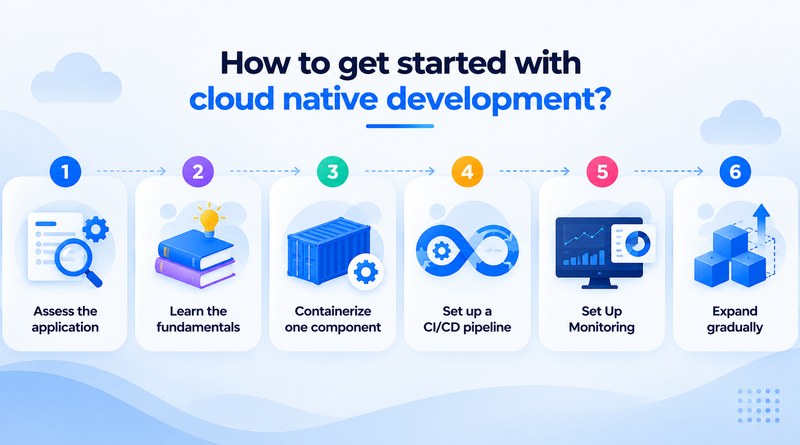
Assess the application
List the components, data flows, and dependencies across the system, and note which services can be separated cleanly from the rest. That list decides the order of every later step.
1 -
Learn the fundamentals
Study containers and Kubernetes, and use the free courses the CNCF publishes. Hands-on practice helps the concepts stay, and a small test cluster gives you a safe place to practice.
2 -
Containerize one component
Choose a stateless service, since it carries the lowest risk. Write a Dockerfile, test the image locally, and store it in a registry. That first container becomes the template for the next ones.
3 -
Set up a CI/CD pipeline
Begin with the first container and automate its tests and deployment. A commit should trigger a build, run the tests, and push the result to a staging environment. Teams trust a process once it has worked every time without anyone watching over it.
4 -
Set up monitoring
Do this before the service reaches production, ideally well ahead of launch. Gather system logs, then set alerts for error rates. If the numbers look right, you know the service is performing as intended.
5 -
Expand gradually
Shift the remaining services across in sequence, and scan each one for security issues before it goes live. After each migration, review the outcomes and update the plan as needed. Going slowly costs little and avoids the large failures.
6
Concluding Insights
Every cloud native team follows the same path: small services, repeatable pipelines, and infrastructure that responds to demand. The payoff is measurable in release frequency, recovery time, and cost per request. AI workloads, edge computing, and global audiences now set a higher standard for all three, establishing this model as the default foundation for modern software.
Platform engineering, serverless models, and intelligent automation will broaden these capabilities over the coming years. Teams can start early by containerizing a single service in the current stack and watching the pipeline run. Each step adds skill and momentum, and organizations that begin today position their software for a faster, more adaptive future.
Frequently Asked Questions
1. How does Cloud Native work?
The application is split into small services, and each service runs in its container. Kubernetes or a comparable orchestrator starts those containers, replaces any that crash, and runs more or fewer instances as traffic rises and falls. Updates reach production through automated pipelines. A change to one service triggers a redeployment of that service only.
2. What are the benefits of Cloud Native applications?
A team can change and release one service on its own schedule, so delivery moves faster. If a component fails, the others usually keep running. Costs follow real usage, because capacity grows and reduces with demand. Developers also spend less time on routine setup and manual fixes.
3. What is the difference between Cloud Native and traditional applications?
A traditional application is usually one large codebase deployed as a single unit on fixed servers. Scaling means scaling the whole thing, and every release carries more risk. A Cloud Native application is built from independent services that scale, update, and recover on their own, and it assumes the underlying infrastructure can change at any time.
4. Can existing applications be converted to Cloud Native?
Yes, though it rarely happens in one move. Most teams start by putting the application in containers, then pull out one self-contained service at a time and add automated pipelines and monitoring as they go. Some parts may be cheaper to leave or rebuild, so it’s best to assess each one before deciding.