
 Jyoti Prasad
Emails are now an integral part of daily communications.
Every time you notice a message that your business email account has been accessed from an unidentified location—most likely—you quickly change your email password. However, the key question remains: How did attackers gain access to my email account in the first place?
There are multiple routes to access your professional email account, from phishing schemes, data breaches, and malware to weak passwords. The route taken to get authorized access determines how much of your information is stolen, and remember, even your strong password combination sometimes fails to protect against such breaches.
This is where two-factor authentication (2FA) comes in.
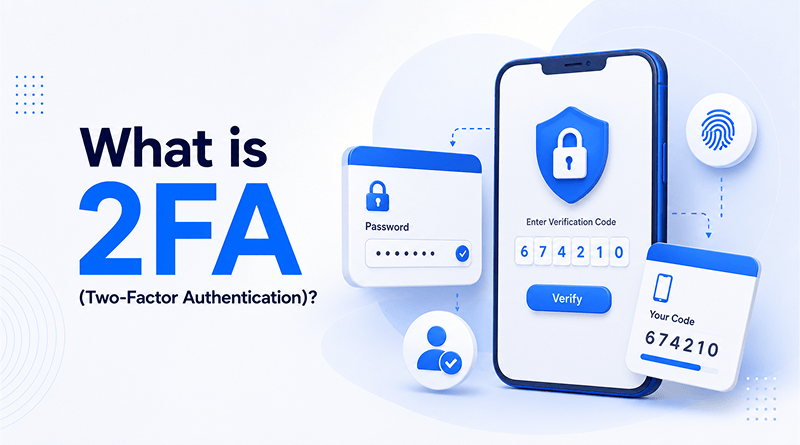
2FA adds an additional layer of security to your account. With 2FA, you can’t just submit your password and get access to your account. To authenticate access, you also need a unique verification identifier (an additional step) to get access to your account.
The use of two-factor authentication has significantly increased throughout email services, banking applications, social networking sites, cloud hosting services, and website control panels over the past few years. It’s one of the most effective and widely used methods of thwarting unauthorized access to online accounts.
In this guide, you’ll learn what 2FA is, how two-factor authentication works, what a 2FA code is, the different types of authentication methods available, how 2FA compares to MFA, and the best practices for securing your accounts.
TL;DR
- ✓ 2FA, as a procedure to authenticate users, consists of two levels of user authentication to access the account. An example of an authentication method is a password (the first authentication method), along with a hardware device (for example, a smartphone, a security device, or a software application such as an authenticator) OR fingerprint/facial recognition (the second authentication method).
- ✓ If a cybercriminal steals your password, there is still a high likelihood that your account will be accessed without the successful second-level authentication.
- ✓ Common examples of 2FA methods include SMS codes (text messages), authenticator applications, push notifications, hardware security keys, and biometric identification methods.
- ✓ A 2FA code is usually a single-use or time-sensitive code created by the authenticator application and sent via SMS/text message, e-mail, or other verification means.
- ✓ The use of 2FA SMS text messages is a better means of authenticating users than just using the password. Authenticator applications and hardware security keys can thus protect users from phishing attacks.
- ✓ 2FA is a subset of Multi-Factor Authentication (MFA), which is any authentication using more than one means of identity verification.
Key Takeaway: The most effective and easiest way to make sure your account is more secure is to enable two-factor authentication on all important account types, including email, banking, cloud, and web-hosting service accounts.
Table Of Content
What is 2FA?
2FA adds an additional layer of security by requiring two forms of verification when logging into an account, an app, or a system. The first form is typically something that is known, like a password or PIN, and the second form can either be something that you have, like a smartphone, an appropriately configured auth app, or a hardware security key. It can also be something that shows your unique identity, such as a fingerprint or a facial scan.
The purpose of two-factor authentication is to add another level of security to your account; once enabled, even if your password gets stolen or guessed, you still need the second form of verification to gain access.
The Top Authentication Factors
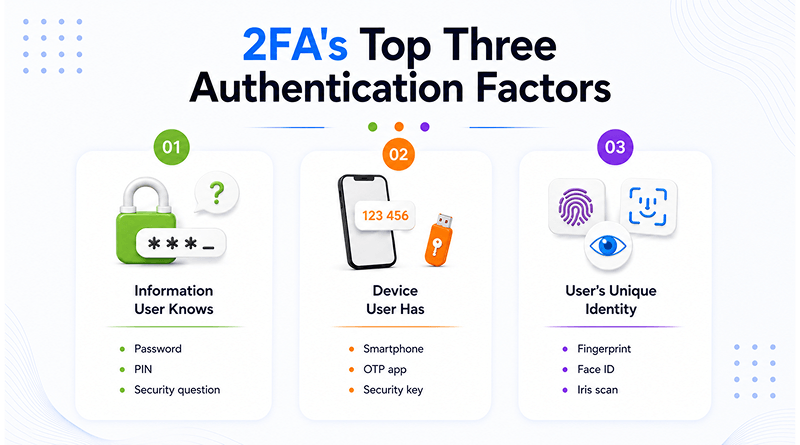
Most authentication systems rely on one or more of the following factor categories:
| Authentication Factor | Description | Example |
|---|---|---|
|
🔑
Information User Knows
|
Information only the user should know | Password PIN Security Question |
|
📱
Device User Has
|
A physical device or item the user possesses | Smartphone OTP App Security Key |
|
🛡️
User’s Unique Identity
|
Biological characteristics unique to the user | Fingerprint Face ID Iris Scan |
For example, when a person/breacher logs into an account with just the password, they are using a single method of authentication to gain access to that account. Compared to two-factor authentication, this method of access is less secure.
With two-factor authentication, the breacher needs a second method of authentication as well to gain access to any account. So even if they have obtained the username and password, it’s still difficult for the breacher to gain access to the account.
Step-by-Step: How does 2FA Works?
Two-factor authentication functions when you add another form of verification along with your PIN or password. This additional verification provides assurance for secure access to the account by the user only.
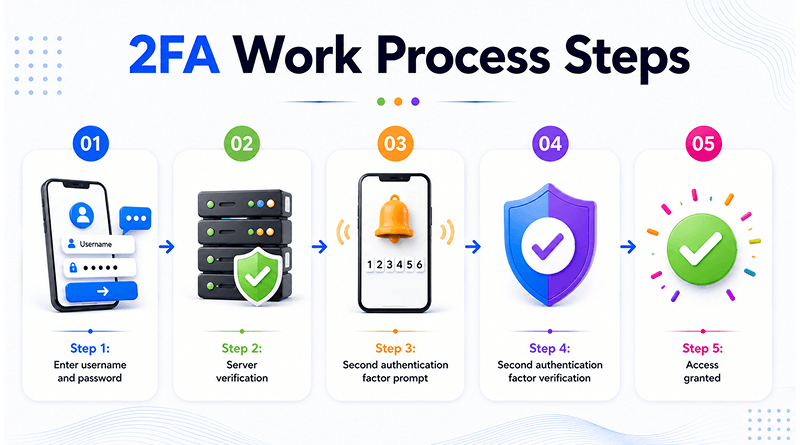
Here’s a detailed step-by-step guide on how a typical two-factor authentication process works:
Step 1: Enter username and password
Just like any other login process, you have to enter your username/email address/password on the website/application/service you want to log into. Here, the password serves as the first factor of authentication (i.e., information that you know).
Step 2: Server verification
Access will be denied if either of your username/password credentials does not match. Once it matches correctly, a second authentication factor is asked for instead of granting direct access right away.
Step 3: Second authentication factor prompt
After your password has been verified, a prompt for an additional authentication method (depending on what verification methods you have enabled) is sent: It includes:
- One-time password (OTP)
- Push notification request
- Hardware (USB) security key
- Fingerprint or facial recognition verification
- Other approved identification method
Step 4: Second authentication factor verification
Here, you put your second authentication factor for verification. This means that you need to validate your identity to gain access to your account.
Here are common examples of what the second authentication factor includes:
- A 6-digit verification code from the authenticator app
- SMS verification code sent to mobile device
- Approve button for your trusted devices
- A fingerprint or Face ID
- A security key to gain access
Step 5: Access granted
When the second authentication factor is validated, you are confirmed as the legitimate user and are permitted to access the account.
Thus, once both the first and second authentication factors are verified, the 2FA (Two-Factor Authentication) process is complete.
📚 Useful Guides
How to Enable Two-Factor Authentication in MilesWeb Client Area?
Secure your MilesWeb client account with 2FA.
→
How to Enable Two Factor Authentication from cPanel
Protect your cPanel login using two-factor authentication.
→
How to Set a Two-Step Authentication (2FA) in DirectAdmin?
Enable an additional security layer for your DirectAdmin account.
→
What is a 2FA Code?
A 2FA code is a temporary verification code used as the second authentication factor during the login phase of the 2FA process. After successfully entering your username/password, you need to input a second authentication code to prove your identity as the legitimate owner of the account.
Usually, a 2FA code is a short number (mostly, 6 digits). This code is valid only for a brief time (around 30-60 seconds). Because of the rapid cycling of numbers and inability to reuse them again (one-time use policy), these codes are more difficult for an attacker to exploit than a traditional password.
How Does a 2FA Code Work?
When you try to log in to an account with 2-factor authentication, the server first checks if your password is valid. In the next step, it generates a second authentication method in the form of a unique code.
This unique code only allows you to access your account.
If the code is entered correctly (within the valid timeframe), then you get access. However, if the code was incorrect (or expired), you have to create a new code and enter it again.
Where Do 2FA Codes Originate?
Where two-factor authentication codes are generated varies with the authentication type (e.g., texted to a user or voice call).
| Source | How the Code Is Delivered |
|---|---|
|
📱
SMS Authentication
|
Text Message Sent as a text message to your registered phone number. |
|
📞
Voice Authentication
|
Phone Call Delivered through an automated phone call. |
|
🔐
Authenticator Apps
|
Local Code Generated locally within apps such as Google Authenticator, Microsoft Authenticator, or Authy. |
|
📧
Email Verification
|
Email Sent to your registered email address. |
|
🔑
Hardware Security Devices
|
Security Key Generated by or verified through a physical security key or token. |
Why are 2FA Codes Important?
If your password is stolen or compromised, the breacher is unlikely to know your temporary verification code. The code is unique to each user and changes regularly, adding another barrier that makes unauthorized access more difficult.
Authentication codes help keep your online accounts, bank accounts, email accounts, cloud apps, and other devices with sensitive information safe. Familiarizing yourself with each type of 2FA helps you determine which is the best fit for your authentication needs and security level.
2FA Methods Comparison: What are the Types of 2FA Codes?
| Type | Phishing-Resistant | Works Offline | Setup Difficulty | Recommended For |
|---|---|---|---|---|
|
📱
SMS / Voice OTP
|
Low | No | Easy | Casual users and services with limited authentication options |
|
🔐
Authenticator Apps (TOTP)
|
Medium | Yes | Easy to Moderate | Most individuals and small businesses |
|
🔔
Push Notifications
|
Medium to High | No | Easy | Users seeking convenience and security |
|
🔑
Hardware Security Keys
|
Very High | Yes | Moderate | Developers, administrators, enterprises, and high-value accounts |
|
🧬
Biometric Factors
|
High* | Usually Yes | Easy | Smartphones, laptops, and device-based authentication |
1. SMS/Voice One-Time Passwords (OTP)
The most popular form of 2FA is SMS and/or voice-based OTPs. When you attempt to log in, an automated message sends a temporary verification code to your registered mobile phone number through text message or automated voice call. You enter this code to complete the security authentication and log in to your account.
Benefits
Simple to implement and use, 2FA SMS is highly compatible with most online services without any additional application handling.
Drawbacks
They may be susceptible to SIM-swapping. The messages may get intercepted if someone has access to the service where you received the SMS. Especially for voice SMS, you need to handle the device with care. Also, SMS codes necessarily need access to the cellular network to make cell phone calls.
While 2FA via SMS OTP offers much greater security than simply relying on a user ID/password combination, security experts still recommend that you utilize a more secure alternative when available.
2. Authenticator Apps (TOTP)
Authenticator applications create time-limited one-time passwords (TOTP) on your device.
Applications such as Google Authenticator, Microsoft Authenticator, and Authy can create six-digit codes that automatically reset every thirty seconds. Since these codes are produced in real-time on your device, there is no need for them to use the SMS network or other forms of internet connectivity.
Benefits
More secure than using SMS authentication.
Can be used when you don’t have access to mobile data.
Supported by a number of websites and other applications.
Can be used when you don’t have access to mobile data.
Supported by a number of websites and other applications.
Drawbacks
You need to install and set up the application before you can use it.
If you lose your phone, you may face difficulty recovering your account without a backup.
If you lose your phone, you may face difficulty recovering your account without a backup.
For most consumers, authenticator applications are among the most reliable ways to achieve the right balance between security and convenience.
3. Push Notifications
Push-based authentication directly mitigates the manual code authentication when you log into an application.
Here, at the time you try to log in, you receive a text message to a trusted device with an approval request. The device shows the login attempt, and you can choose to “approve” or “deny” the request.
Many identity service providers, including Microsoft Authenticator, Duo Security, and other enterprise-level identity solutions, use this method of authentication.
Benefits
Authentication is fast and user-friendly.
The user does not need to manually enter a verification code.
The user receives the ability to authenticate with additional contextual information regarding the login attempt.
The user does not need to manually enter a verification code.
The user receives the ability to authenticate with additional contextual information regarding the login attempt.
Drawbacks
The user must have internet connectivity to use this method of authentication.
If the user does not pay attention to the request and accidentally approves a fraudulent login attempt, they have authorized an untrusted login.
If the user does not pay attention to the request and accidentally approves a fraudulent login attempt, they have authorized an untrusted login.
When push notifications are used correctly, users achieve an overall user experience and a high level of security.
4. Hardware Security Keys
Physical hardware security keys are used to provide authentication for users when they sign on to their account. A typical use case of a physical security key is connecting it (via USB, near field communication (NFC), or Bluetooth) to the authentication device and touching it at the time of authentication. Many modern security keys use FIDO2 or WebAuthn standards.
Benefits
They resist phishing attempts effectively.
They provide strong protection against credential theft.
Users don’t have to enter code numbers.
They provide strong protection against credential theft.
Users don’t have to enter code numbers.
Drawbacks
Users need to purchase a physical device.
If the key is lost, it must be replaced or recovered using a backup method.
If the key is lost, it must be replaced or recovered using a backup method.
For people with critical accounts or who routinely handle sensitive data and documents, hardware security keys are one of the most trusted forms of two-factor authenticators.
5. Biometric Factors
Biometric authentication includes the use of fingerprint scans, facial recognition, iris recognition, or even voice recognition. Instead of having to enter a code number, users authenticate their identity by conducting a biometric scan with an approved device.
Benefits
They are quick and easy to use.
They are virtually impossible to replicate.
Users don’t have to remember their password (or the code they used to authenticate).
They are virtually impossible to replicate.
Users don’t have to remember their password (or the code they used to authenticate).
Drawbacks
The user needs to have compatible hardware.
If the user had their biometric data compromised, there is no way to change that data.
Most biometric authentication must be conducted together with device-based security measures.
If the user had their biometric data compromised, there is no way to change that data.
Most biometric authentication must be conducted together with device-based security measures.
Biometrics are becoming increasingly common on mobile phones, laptop computers, and enterprise-level authentication systems.
What is the Best Type of 2-Factor Authentication (2FA)?
Generally speaking, when determining which 2FA method is best for you, authenticator apps (TOTP) typically provide the best balance between convenience, affordability, and security. If you have a highly sensitive account that needs added security, you may want to consider hardware security keys, which provide additional protection against phishing and credential-based attacks.
Whatever type of 2FA you decide to use, enabling these types of security measures will always provide a greater level of security than just using passwords.
2-Factor Authentication vs. Multi-Factor Authentication
2-factor authentication (2FA) and multi-factor authentication (MFA) are terms that are often used interchangeably; however, the terms are not synonymous.
The primary difference between the two types of authentication is based on the number of factors in the user’s authentication process.
2-factor authentication requires 2 separate authentication factors to verify the identity of the user, while multi-factor authentication is a general term to describe an authentication process that uses 2 or more distinct factors to authenticate the identity of the user. In summary, all instances of 2-factor authentication are examples of multi-factor authentication; however, not all examples of multi-factor authentication will be limited to just 2 authentication factors.
2FA is when an identity requires at least two separate pieces of information; for example, an account requires both a password and a one-time verification code sent to a user’s mobile device (SMS) to access the account and may utilize 2FA. However, if you added the requirement of a hardware security key and a fingerprint to log into your account, then the user is utilizing multi-factor authentication (MFA) because there are multiple pieces of independent criteria being requested to identify the user.
2FA vs MFA: Key Differences
| Feature | 2FA (Two-Factor Authentication) | MFA (Multi-Factor Authentication) |
|---|---|---|
| Number of Factors | Exactly 2 | 2 or More |
| Security Level | Strong | Stronger when additional factors are used |
| Complexity | Lower | Higher |
| User Experience | Faster and simpler | Can require additional verification steps |
| Common Examples | Password + OTP, Password + Authenticator App | Password + Security Key + Biometric Verification |
| Typical Use Cases | Personal accounts, websites, banking apps | Enterprises, government systems, highly sensitive environments |
What are the Benefits, Limitations & Threats of 2FA?
2FA is considered an effective means to improve the security of your online accounts; however, like any other means of securing sensitive data, 2FA through text messaging has advantages, disadvantages, and potential threats. A thorough review of the advantages and disadvantages allows the end-user to better protect their online account.
Benefits of 2FA
| Benefit | How It Helps |
|---|---|
| 🛡️ Enhanced Account Security | Adds a second layer of protection beyond passwords. |
| 🔑 Protection Against Stolen Credentials | Prevents attackers from accessing accounts using only compromised passwords. |
| 🚫 Reduced Risk of Account Takeovers | Makes it harder for cybercriminals to gain unauthorized access. |
| 📂 Better Defense Against Data Breaches | Exposed passwords become less useful when a second factor is required. |
| 🤝 Increased User Trust | Demonstrates a stronger commitment to protecting user accounts and data. |
| ⚙️ Easy to Implement | Most modern services offer built-in 2FA support through apps, SMS, or security keys. |
| ✔️ Supports Compliance Requirements | Helps organizations meet various security and regulatory standards. |
For most users, enabling two-factor authentication provides a substantial security improvement with minimal effort.
Limitations of 2FA
| Limitation | Explanation |
|---|---|
| ⏳ Additional Login Step | Users must complete an extra verification process during sign-in. |
| 📱 Device Dependency | Losing access to a phone or security key can complicate account recovery. |
| 📩 SMS Vulnerabilities | SMS-based authentication can be exposed to SIM-swapping attacks. |
| 🔐 Recovery Challenges | Poor backup planning may lead to temporary account lockouts. |
| 🎣 Not Immune to Phishing | Some forms of 2FA can still be targeted by sophisticated phishing attacks. |
| ⚠️ Compatibility Limitations | Certain older systems may not support modern authentication methods. |
These limitations highlight why choosing the right type of 2FA is important, especially for accounts containing sensitive information.
Common Attacks Against 2FA
Although two-factor authentication provides high protection, cyber criminals continue to devise new ways to exploit weak examples of two-factor authentication.
- Phishing Attacks
As part of their advanced phishing schemes, cybercriminals can make fake login screens that capture both passwords and one-time (or temporary) verification codes. In cases where the victim has entered both their login credentials and OTPs on a fictitious site created by the cybercriminal before the temporary verification code times out, the cybercriminal can use the user credentials immediately.
🛡️ Best Defense: Whenever possible, utilize verification methods that are resistant to phishing, such as hardware security keys.
- SIM-Swapping Attacks
A SIM-swapping attack occurs when a cybercriminal convinces the victim’s mobile carrier to transfer the victim’s phone number to a new SIM card that is under the control of the cybercriminal. Once the cybercriminal has completed this, the SMS-based authentication codes utilized for two-factor authentication are sent to the cybercriminal’s phone.
🛡️ Best Defense: Use an authentication application or security keys over SMS for verification whenever possible.
- MFA Fatigue (Push Bombing)
MFA fatigue, or push bombing, refers to an attack technique whereby an attacker attempts to convince the victim to authorize a login by sending repeated authentication requests to the victim’s devices. The repeated action forces the user until they agree to authorize at least one login attempt.
🛡️ Best Defense: Carefully analyze all two-factor authentication requests and don’t approve any request for login authorization that is associated with a login attempt you did not initiate.
- Man-in-the-Middle Attacks
At times, an attacker can access and intercept communication in real-time between users and services. This allows the attacker to capture the user’s authentication information. Although modern encryption prevents this risk, poorly secured environments can still be vulnerable to this type of attack.
🛡️ Best Defense: Verify the URL of the website, use secure connections, and do not enter your login credentials on untrustworthy or questionable websites.
- Malware and Device Compromise
If malware installed by an attacker is infecting your device, this malware could potentially obtain your authentication codes, session tokens, or login credentials.
🛡️ Best Defense: Keep your devices up-to-date, use reputable security software, and avoid downloading files from unknown sources.
Best Practices for Using 2FA
Enabling two-factor authentication is an essential first step; however, how you implement and manage it affects your overall security. Below are several tested, successful methods that you can use to enforce the effectiveness of 2FA. Following these best practices maximizes the protection.
| Best Practice | Details |
|---|---|
| ✓ Authenticator Apps Use Authenticator apps instead of SMS when possible |
Authenticator apps generate verification codes directly on your device and are not vulnerable to SIM-swapping attacks. Popular options include Google Authenticator, Microsoft Authenticator, and Authy. |
| ✓ Protect Critical Accounts Start with your most important accounts first |
Prioritize accounts that contain sensitive information or provide access to other services, such as email accounts, banking accounts, cloud storage, web hosting accounts, social media accounts, and administrative dashboards. |
| ✓ Backup Codes Store backup codes in a safe place |
Save recovery or backup codes in a secure location, such as an encrypted password manager or offline backup. Avoid storing them in unsecured documents or sharing them with others. |
| ✓ Security Keys Use hardware security devices for high-value accounts |
Hardware security devices provide stronger protection against phishing attacks and are recommended for sensitive accounts, financial systems, and administrative environments. |
| ✓ Recovery Information Ensure your recovery information is up to date |
Regularly update your recovery email address, trusted phone number, backup authentication methods, and registered security keys to avoid account recovery issues. |
| ✓ Verify Requests Don’t approve unknown authentication requests |
Never approve authentication requests that you did not initiate. Unexpected requests may indicate an attempted account compromise. |
| ✓ Strong Passwords Use 2FA with a strong password policy |
Use strong, unique passwords for every account, create long passphrases, and store credentials securely with a password manager. |
| ✓ Security Review Routinely check your account security settings |
Regularly verify that 2FA is enabled, trusted devices are accurate, and recovery information is current. |
2FA Best Practices Quick Reference
- Activate 2FA for each account with critical information.
- The use of an authenticator app is preferred to SMS.
- Store backup / recovery codes in a safe place.
- Use a hardware security key to access high-sensitivity accounts.
- Ensure your recovery Information is up-to-date.
- Don’t approve unsought authentication requests.
- Generate strong, unique passwords in addition to 2FA.
- Regularly review your 2FA settings.
Knowing about best practices firmly establishes strong account security and offers max 2FA benefits.
Summary
As cyber threats evolve, you need to protect your data more vigilantly. Using a password as a sole form of protection for your online accounts is no longer effective. The issues of online data breaches, phishing attacks, and password sharing have made traditional forms of logging into accounts insecure. This is where 2FA can be useful.
2FA adds a second method to your password as an additional layer of security and prevents unauthorized entry into your online accounts. This could be a one-time code via SMS, an authenticator app, a push notification, fingerprint readers, or hardware tokens. All these authentication factors work together to ensure only authorized users access your account.
A completely secure system does not exist. Yet, 2FA is an effective way to reduce the risk of stolen credentials. Setting up 2FA on your personal accounts only requires a few minutes of effort and protects your accounts from being hacked—email, banking, social media, cloud storage, web hosting control panels, etc.—throughout the Internet.
If you are using any online service without 2FA activated, our advice is simple: Turn on the feature.
FAQs
1. Are there ways to get around two-factor authentication?
Yes, but not without a lot of effort—cybercriminals find ways to bypass two-factor authentication. Some examples include phishing, SIM card swapping, installing malware on the user’s computer, and exploiting multiple forms of methods by continuously requesting approval over and over. Although two-factor authentication is not foolproof, enabling it gives you much better security than anything else available.
2. What happens if I lose my 2FA device?
Most companies provide a way to recover your account when you lose your authentication device. Your options usually include one or more of the following to help you recover your account: backup codes, recovery emails, an additional device, or other means of account recovery. As a precaution, save copies of your backup recovery codes and ensure that you use current account details as recovery options when you set up 2FA.
3. Is SMS 2FA safe?
To a certain extent, SMS 2FA is more secure than password authentication alone. However, there are still risks associated with using SMS verification, such as SIM swapping or intercepted SMS, making it less secure than authentication apps or hardware security keys. Therefore, if possible, consider using other means of 2FA verification instead of SMS.
4. What is the most secure form of 2FA?
Hardware security keys are one of the most widely used forms of 2FA, and they are extremely effective at preventing phishing attempts, credential theft, and other authentication bypass techniques.
5. Do I need 2FA when I have a secure password?
Yes, you should use two-factor authentication and a secure password. Even if you have an excellent password, you could fall victim to a data breach or to phishing, malware, or some other unintended way that exposes your password. 2FA is an additional layer of security to keep your account secure, even if you do have a compromised password.