
 Gaurav Bodhare
Few technology combinations reshape how developers create products, and the MERN stack holds a permanent place on that short list. MERN stands for MongoDB, Express.js, React, and Node.js, four technologies that share JavaScript across the front end, back end, and database. Four technologies, one language—that single detail changes how a team plans a development cycle, hires an engineer, or debugs a compromised feature at midnight.
A React component, an Express route, and a MongoDB query all use the same underlying language, so a developer doesn’t have to switch syntax while moving between them. That shared foundation reduces the friction teams usually face when managing separate frameworks for each layer, and it pairs well with modern cloud hosting setups built around fast, JavaScript-native deployments. In this blog, we will explore how the MERN stack architecture works, why development teams continue to choose it, and how to deploy a simple application using the stack.
Table Of Content
What is MERN Stack Architecture?
MongoDB, Express.js, React, and Node.js each cover a separate part of the stack, without overlapping in what they handle. MongoDB records don’t sit in rows and tables; they exist as documents, so the structure can vary from one record to the next. Between the client and the database sits Express.js, managing routing and the server logic that ties everything together. On screen, React decides what the user sees and how it responds to a click or a keystroke. Node.js runs the back end, and it does that entirely in JavaScript, no second language required underneath.
This is where the setup becomes useful in practice. A user clicks a button in the React interface; that action triggers a request to an Express route, and Express pulls or writes data in MongoDB through Node.js. The response comes back in the same JSON format the whole way through, so nothing needs to be reformatted mid-journey. A developer moving from a React component to a database query rarely has to stop and think about syntax, because the syntax doesn’t change. Debugging follows the same logic. A broken feature can be traced from the browser console straight through to the database query without changing programming languages, which saves real hours on a team working against a deadline.
What are the Components of the MERN Stack?
The MERN stack has four components, each carrying a specific role.
How Does It Work?
Picture a task manager app. Someone adds a new task, and React captures that click and sends it off through an API call. Node.js picks up the request first and routes it to Express.js, which checks the input, confirms the user has permission, and builds the right database query. MongoDB stores the new task and sends confirmation back through the same path, and React updates the screen without a full page reload. One language runs the entire trip, front door to back door, which is a large part of why teams move faster once they’re comfortable with the stack.
What are the Advantages of the MERN Stack?
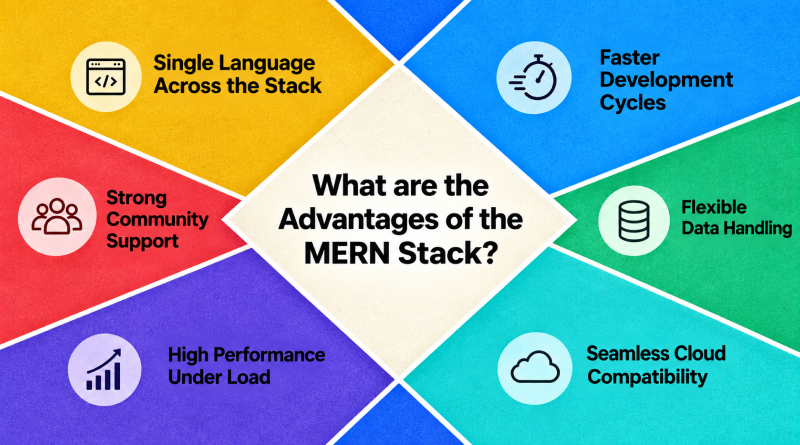
Developers don’t pick MERN because it’s trendy. They pick it because it solves real problems under real deadlines. Six advantages stand out in day-to-day use.
Related Read : Node.js vs Express.js: Which One You Should Opt For?
What are the Common Use Cases of the MERN Stack?
MERN shows up across a wide range of production applications, and teams migrating off older frameworks often lean on it for a smoother website migration.
How Does the MERN Stack Compare to the MEAN Stack?
The MERN and MEAN stacks differ in exactly one place: MERN uses React, and MEAN uses Angular, while MongoDB, Express.js, and Node.js stay the same either way. The choice between them usually rests on how a team prefers to build the interface rather than on infrastructure, since both run without issue on any current cloud platform.
Related Read : Best Angular Hosting Providers
Is the MERN Stack Still Relevant in 2026?
JavaScript demand among employers has remained steady going into 2026, and that alone keeps MERN in active use across new projects. A team bringing on a new engineer mid-project also gains from the single-language setup: one person can read the front end and back end without needing separate training time for each.
React still leads front-end development by a wide margin. Node.js remains a common pick for scalable services, and MongoDB continues to expand into cloud-native workloads. Deployment has gotten easier too; a MERN app runs fine on a shared server, VPS hosting, or a fully managed cloud setup, depending on what the project actually needs. New tools will keep appearing around this stack, but the core four will keep adapting instead of being replaced.
How to Build a Simple MERN Stack Application?
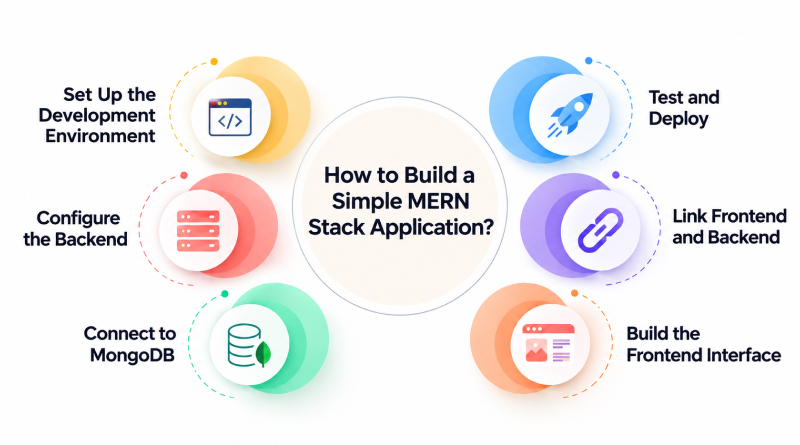
Take a basic task manager as an example. The steps below cover what it takes to get one running, and the same sequence scales to bigger projects built with React on the front end.
01
Set Up the Development Environment
Install Node.js and npm, then create a project folder with separate subfolders for the client and the server.
02
Configure the Backend
A Node.js project is initialized first, followed by Express.js, and the first few routes go in to handle whatever requests come through.
03
Connect to MongoDB
Link the server to the database through Mongoose or the native MongoDB driver, then confirm the connection with a quick test query.
04
Build the Frontend Interface
A React application starts with Create React App or Vite, and from there the interface takes shape one component at a time: forms, lists, buttons, whatever the app actually calls for.
05
Link Frontend and Backend
API calls tie React to the Express server, most commonly through Axios or the Fetch API, giving data a path to move in both directions.
06
Test and Deploy
Run the app locally first to catch obvious bugs, then push the client and server to a hosting environment built for production traffic.
Wrapping Up
MERN has held its ground for a reason. Four established technologies running on one language remove the overhead of maintaining separate frameworks for every layer, and that trade-off continues to serve teams that need both speed and consistency. The stack scales from a weekend project to a platform serving millions of users, and its continued relevance heading into 2026 says a lot about how the industry is settling around full-stack JavaScript.
For anyone ready to try it, the smallest project is the right place to start. Set up MongoDB, build an Express route, connect it to a React interface, and deploy it somewhere live. That small win develops the necessary skills to tackle larger projects, and it typically demonstrates that the stack can manage whatever challenges the next project presents.
Teams that bypass the small project and dive directly into something ambitious often encounter the same obstacle: too many components to debug simultaneously, without a working version to compare against. A small first build avoids that problem. It provides the team with a foundation to build upon, and from that point, expanding the project becomes simply a matter of scale.
Frequently Asked Questions
1. Is the MERN stack frontend or backend?
It covers both. React makes up the frontend, while MongoDB, Express.js, and Node.js together form the backend, which is why the stack is described as full-stack.
2. What is the typical timeframe for learning the MERN stack?
The timeline varies with prior experience. A developer already familiar with JavaScript can typically learn the fundamentals of all four technologies within four to six weeks. Someone starting from scratch usually needs two to three months to build a working application from start to finish.
3. Do I need to master MongoDB, Express, React, and Node individually before building an MERN app?
No. Attempting to master each technology in isolation tends to slow the learning process down. A working knowledge of each component is sufficient to begin, since the components become clearer when connected in an actual project.
4. Can a MERN application handle large-scale traffic?
Node.js manages concurrent requests well on its own. Beyond that, three additions handle scale: load balancing across server instances, caching for frequently requested data, and proper MongoDB indexing. With those in place, a MERN application supports heavy production traffic without a different architecture.