
 Gaurav Bodhare
An AI agent that can browse, write code, and manage files sounds like something out of a much larger budget than most people expect. Agent Zero brings that capability within reach, and once it is up and running on a server, a new question naturally follows. Is it actually safe to leave an agent with this much reach connected to the internet? The short answer is yes, provided it is set up with the same care given to any tool capable of acting on your behalf. This guide walks through where the real risks sit, what separates Agent Zero from a typical website, and the practices that keep a self-hosted agent on your VPS under your control.
Table Of Content
Where Safety Stands
Running Agent Zero on a VPS is safe when the basics are handled properly. The framework itself carries no inherent risk. An instance left open on a public address, protected by a weak password, becomes a real risk when no one checks in on it. This pattern holds true for nearly every self-hosted tool, not just Agent Zero. A closer comparison would be handing someone a set of keys. The keys themselves are harmless. What matters is who holds them and how easily they could be copied.
What Makes Agent Zero Different
Most software running on a VPS, a WordPress website, a portfolio, or an online store exists to be viewed. A visitor reads a page or submits a form, and the risk stops there. Agent Zero works differently. It executes code, installs packages, browses websites, and reads or writes files directly on its host server. The value of that capability lies in its ability to delegate real tasks rather than merely display them. It also means anyone who gains access to an Agent Zero instance holds a way to issue commands on the server, not merely view a page. That distinction is the reason security deserves attention from day one.
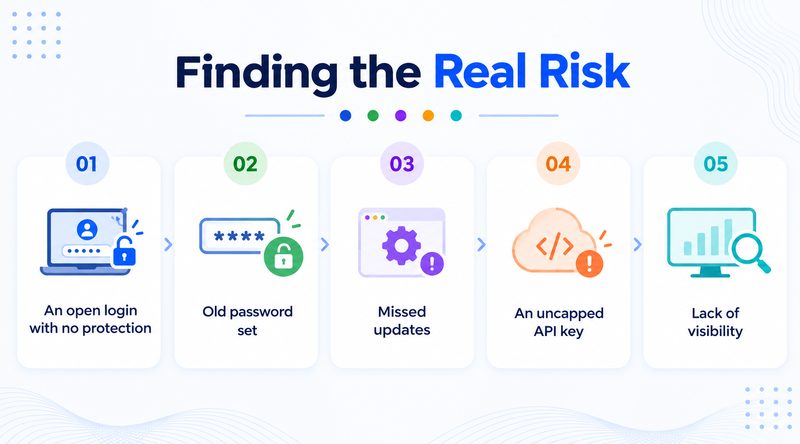
Finding the Real Risk
A VPS, by itself, is a dedicated share of server resources with full root access granted to the owner. It carries no built-in vulnerability compared to other hosting types. This level of website security is entirely dependent on the configuration. With Agent Zero, a short list of practices creates most of the risk, and each one is easy to correct.
Highest risk
An open login with no protection
A public address with no password, or a weak one, invites anyone who finds it to issue commands. This vulnerability is the largest risk and the simplest one to close.
Missed updates
Agent Zero and its underlying Docker image receive frequent updates, and security fixes are a regular part of those releases. A server missing months of updates carries greater risk than one refreshed on a routine schedule.
An uncapped API key
The AI provider’s API key drives Agent Zero’s reasoning, and an uncapped key can run up unexpected charges during a stuck loop or a runaway task. Most providers allow a usage cap in minutes.
Old password set
A quick password used during setup often stays in place far longer than planned. Revisiting it once the server reaches daily use closes that gap.
Lack of visibility
Agent Zero can run longer tasks on its own, which is part of its appeal. Checking in periodically still helps establish what normal activity looks like.
Related Read : Hetzner VPS Migration Checklist: Step-by-Step Guide
VPS Compared With Other Options
Running Agent Zero on a personal laptop ties the agent to whatever else that machine is doing, and it goes offline the moment the laptop closes. A VPS keeps the agent in a dedicated, isolated environment, unaffected by browser tabs or background apps competing for memory.
Shared web hosting falls short for a different reason. Accounts on shared plans sit alongside many others on the same machine; without the root-level access, Agent Zero needs to run Docker or manage web application firewall rules. A VPS grants that isolation directly, and cloud hosting offers a similar level of control when flexible scaling matters more than a fixed resource allocation. The only real variable left is how carefully the setup gets configured.
A Practical Safety Checklist
Hosting Agent Zero responsibly does not require deep security expertise. A short set of practices covers nearly everything that matters.
A Practical Security checklist
Six quick fixes before regular useReplace any placeholder password with a strong, unique one before the server enters regular use.
Keep access private through a tunnel unless a public domain is genuinely needed, and pair any public setup with HTTPS and a login screen.
Turn on the server firewall, and only keep the ports open that truly need to be reachable from outside.
Set a spending cap on the AI provider key as a quick, one-time step.
Pull the latest Agent Zero Docker image on a regular schedule to stay on a patched version.
Keep periodic backups of anything Agent Zero manages, so a detrimental update never turns into a lasting loss.
Related Read : Best WAF Alternatives for Website Security
Signs Your Setup Needs a Review
A few patterns are worth treating as a reason to review the current setup.
Signs your setup needs a review
Each warning sign comes with a quick fixNo memory of the last login or configuration change.
Fix: Check the server’s login history and keep a short log of every configuration change.
You’re still running the password chosen during the very first install.
Fix: Replace it with a strong, unique password today.
Confirming a usage cap on the AI provider account is a step that has likely been overlooked.
Fix: Set a spending cap in the AI provider’s dashboard. It takes only a few minutes.
An address reachable on the public internet, with no login screen in front of it.
Fix: Put HTTPS and a login screen in front of it, or keep access private through a tunnel.
None of these point to a problem that has already happened. They mark small gaps worth closing early.
Final Thoughts
Running Agent Zero on a VPS holds up well when treated as what it truly is, a tool with real access to a real server rather than an ordinary app. The habits that keep it secure stay small and mostly one-time, without requiring a background in server security.
A private setup by default, a strong password, an active firewall, and regular updates cover most of the work. MilesWeb VPS hosting provides root access, firewall configuration, and steady uptime, the foundation a properly secured Agent Zero deployment depends on. That leaves attention free for the part that matters most, building with the agent.
Frequently Asked Questions
1. Can Agent Zero cause damage if something goes wrong?
Yes, it can cause damage; like any command-running tool, it can make an unwanted change if it is misconfigured or misdirected. This is precisely why access control and regular backups are more crucial here than for a standard website.
2. Should Agent Zero live on a subdomain instead of the main domain?
Yes. A subdomain draws a clear boundary between Agent Zero and a primary website or business email. A problem on one side has no path to reach the other.
3. Does securing Agent Zero require advanced technical knowledge?
No. Working through the checklist once, at setup, handles nearly everything that matters. Only one item requires a second look later, when the server has been running for a while and a routine update or password check becomes worth doing.
4. Does MilesWeb offer built-in protection for VPS servers?
Yes. MilesWeb VPS hosting supports server-level firewall configuration to keep exposure limited, and the support team can help with setup for anyone new to the process.
5. Is it risky to leave Agent Zero running unattended for long stretches?
Not on its own. That capability is part of what makes a VPS useful for this purpose. Periodic check-ins remain a beneficial habit, particularly while learning how the agent behaves on longer tasks.
6. What single step matters most for a beginner?
Confirming Agent Zero is not sitting on a public address with a weak or default password. Every other item on this list matters, but this one turns a minor oversight into a genuine open door.