

 Sommaya Singh
Website building involves a tremendous process, investment, and strategies to launch an online presence. Domain is one of the elements that determines your web identity. If you fail to track its renewal period, it will expire.
Our customer support team receives many messages of domain expiry from consumers. They are confused about the renewal process and what steps to take next. The post overviews everything about the domain life cycle. You’ll learn what happens if you don’t renew your domain and if it can be restored.
Table of Content
The Immediate Effect
The moment the domain expires, most domain providers don’t suspend the services but provide the grace period. MilesWeb offers a 30-day grace period for all TLDs. During this period, you still renew the domain at the standard renewal price, without any penalty or hidden surcharges. So technically, you haven’t lost anything yet.
Many domain name providers suspend website and email services almost immediately upon expiry, even when the domain itself is recoverable behind the scenes. It means visitors could experience the downtime, and any email linked with the domain will start bouncing. The grace period protects domain ownership but doesn’t guarantee your services stay online while you sort out the renewal.
Also Read: Purchasing a Domain Name: A Complete Guide
The Redemption Period
If the grace period passes without renewal, the domain doesn’t disappear immediately; it moves into what’s called the redemption period, which lasts around 30 days. The same principle is applicable for renewing the .com domain. At this stage, the domain is technically recoverable, where registrants have to bear a nominal redemption fee. It is an extra cost that is treated as a special domain recovery service rather than a routine renewal. MilesWeb redemption fees range from ₹6,000 to ₹10,000 for various TLDs.
It is usually the point where people realize how serious a missed renewal actually is. The domain sits in a locked, inactive state during redemption; you can’t transfer it, and nobody else can register it either. However, you also can’t simply renew your way out of it like you could during the grace period. If the domain matters to your business, it’s almost always worth paying the redemption fee rather than letting it slip into the next stage, where recovery is no longer an option at all.
Also Read: Top .io Domain Name Providers
Pre-Release Period
If the domain isn’t recovered during redemption, it moves into pending delete, the final stage before release, which typically lasts about 5 days.
Unlike the earlier stages, there’s no way to pay a fee or renew your way out at this point. The domain is locked in a countdown to release, regardless of your registrar relationship or payment history.
During these 5 days, the domain remains inactive but unavailable to anyone. Your old website and email stay down, and no one else has registered it yet either; it is essentially in limbo.
This stage is irreversible without intervention. There is no legitimate path to reclaim the domain during this period, and by the time a registrar might flag it, the outcome is already set.
Once this pending delete is complete, the domain is released back into the public pool and becomes available for public registration. It includes drop-catching services that specifically target expiring domains.
Established or high-traffic domains are especially at risk here. Domain-sniping tools register them within seconds of release, making recovery essentially impossible without buying it back from whoever claims it, usually at a steep markup.
Also Read: Best .org Domain Name Providers
What After Domain Is Released?
Once the pending delete period ends, your former domain becomes publicly available for registration again. Anyone can register it, just like a brand-new domain that has never been used before.
- Drop-catching services often grab it within seconds: High-value or established domains rarely sit unclaimed for long. Specialized tools monitor expiring domains and register them instantly when released.
- You lose your website entirely: If someone else registers domains, you may lose out on the sensitive content like the home page, product pages, blogs, and financial data. The new owner starts from a blank slate, or worse, could put up entirely unrelated content under your old domain name.
- Email associated with the domain stops working permanently: Any inbox using the domain becomes permanently inaccessible. This is often the disruptive part for businesses, since it can mean lost client communication and account recovery issues on services linked to the email.
- SEO history is not reverted: even if you manage to buy the domain back from registration, search engines don’t restore them as old rankings. Backlinks still point to the domain, but the authority and trust built over time may not transfer, especially if the registrants changed or it was used for something unrelated.
- Buying back the domain becomes expensive: If a competitor claims it, getting the domain back often means negotiating a private sale, and prices for a domain with existing traffic or brand recognition run into millions of dollars.
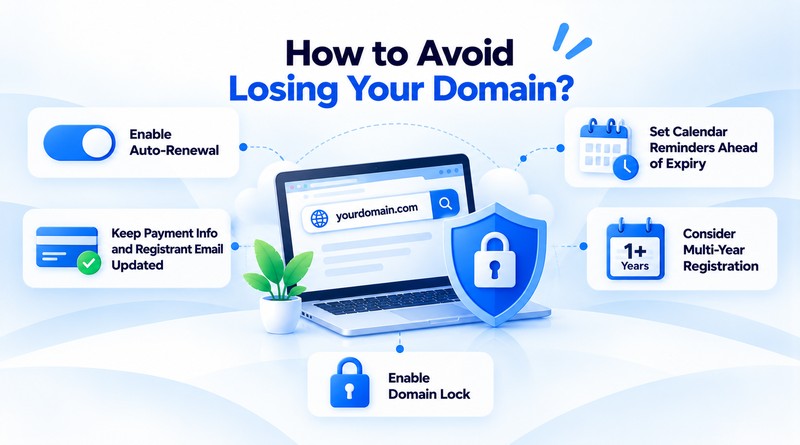
How to Avoid Losing Your Domain?
1. Enable Auto-Renewal
Auto-renewal is the single easiest safeguard against losing a domain; most registrars let you turn on auto-renewal so the charge happens automatically each year without you needing to remember a date. As long as your payment method on file is valid, this alone eliminates the entire scenario this article has walked through.
2. Keep Payment Info and Registrant Email Updated
Auto-renewal works when the card on file is not expired and the renewal confirmation email reaches you. It’s worth checking both every so often, especially after getting a new card and switching email providers, since an outdated payment method or unmonitored inbox quietly reverses the protection auto-renewal is supposed to provide.
3. Consider Multi-Year Registration
Instead of annual renewal, domain registration for two, five, or even ten years eliminates the upfront cost and renewal risks. It is a small upfront cost for the peace of mind of not having to think about expiry again for a while.
4. Set Calendar Reminders Ahead of Expiry
Even with auto-renewal enabled, it doesn’t affect setting a manual reminder a month or two before the domain expiration date as a backup check. Payment failures happen, emails are skipped, and a quick manual glance at the registrar account costs almost nothing compared to alternatives.
5. Enable Domain Lock
While domain lock is technically meant to prevent unauthorized transfers rather than expiry, keeping it active is a good practice for the entire domain security. It ensures that while managing renewals, the domain is not vulnerable to being moved elsewhere without explicit approval.
Also Read: .io vs .com
Conclusion
Losing a domain rarely happens overnight; it is usually the end result of a multi-stage process that gives several changes to catch it before it is gone. The grace period, redemption period, and pending delete stage each offer a window to act, even with increased recovery costs. The real risk is not the expiry date itself, but rather allowing all of these windows to pass without noticing.
The good news is that avoiding the entire situation relies on a few simple habits. To avoid the entire situation, enable auto-renewal, keep your payment method and registrant email current, and conduct occasional manual checks to ensure everything is up to date. None of these take more than a few minutes, but they are the difference between a domain that quietly renews itself annually and one ending up in someone else’s hand.
If your domain has already lapsed, don’t wait to assess where it stands; check its current status, and weigh the redemption cost against starting fresh. And if it hasn’t lapsed yet, take this email as your reminder to double-check that auto-renewal is actually turned on.
FAQs
1. How many days after expiry does a domain stop working?
A domain typically stops working and resolving on the exact expiry date or within a short 1-to-5-day buffer depending on your registrar. During this initial phase, DNS resolution is disabled, stopping all traffic to your linked services.
2. Can I still access my email if my domain expires?
You generally cannot receive new emails because the Mail Exchange (MX) records deactivate when the domain expires. However, you might still log in to an existing local mail client or webmail cache to view old messages, though active server communication halts.
3. Does my website automatically go offline on the expiry date?
Yes, your website usually goes offline or redirects to a registrar-managed parked/expired notice page right on the expiration date. Some registrars disable routing immediately, while others allow a tiny grace window before replacing your live website content.
4. Can someone else register my domain right after it expires?
No, someone else cannot register it immediately because it enters a protective grace period (usually 0 to 45 days) where only you can renew it. It must pass through the redemption and pending deletion phases for a total of 60 to 80 days before becoming publicly available again.