

 Sommaya Singh
Owning a domain pivots your stronger online presence in the digital landscape. After the ownership period ends, you need to renew the domain to ensure seamless accessibility of your website.
Missing the renewal period shows your website will be down, business emails won’t work, and the domain will become available for others to buy. Once someone else registers the domain name, it affects the credibility; you lose your online identity.
As automation has intruded in our daily chores, the renewal process remains untouched. Domain name providers have an auto-renewal feature to exclude manual intervention from this tedious process. Using the feature, registrants can renew the .com domain name.
Table of Content
Also Read: How to Recover an Expired Domain During the Redemption Period?
How Domain Auto-Renewal Works?
Domain auto-renewal automatically extends the web address registration before it lapses by charging the payment method saved in the registrar account.
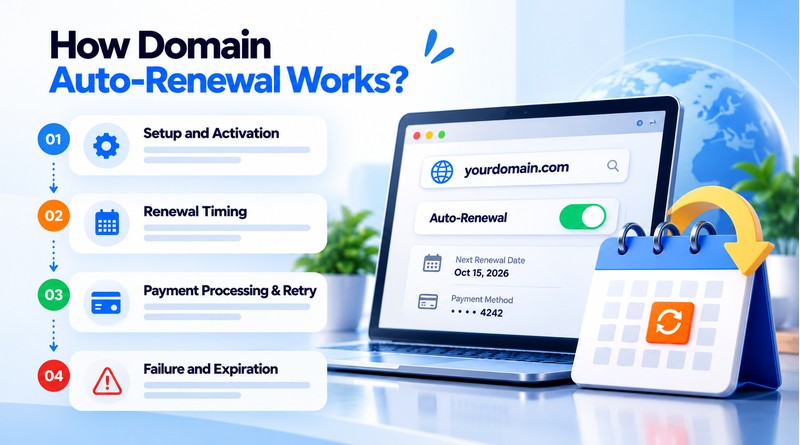
How the Process Works?
- Setup and Activation: You must enable the auto-renew toggle from the control panel of your domain registrar (MilesWeb, and GoDaddy). Verify the transaction with a valid credit card, debit card or account balance.
- Renewal Timing: Registrars automatically start the renewal process a few days to several weeks before the official expiration date. The early window avoids accidental downtime.
- Payment Processing & Retry: We’ll automatically charge you through your default payment method when your payment is due. If a card has expired or declined or failed, the registrar will typically send warning emails and make several retry attempts over a grace period.
- Failure and Expiration: If all payment attempts fail before the expiration date, the domain expires eventually. It goes into a redemption period where you can still get it back (usually for an extra charge) before it is permanently deleted or made available for registration again.
Auto-Renewal Pros
- Prevents Accidental Expiration: Stops your domain from expiring and going into the public pool where your competitors or domain squatters can grab it.
- Protects Brand & Uptime: Keeps your website and email up and running so you will never lose customer trust or search engine (SEO) rankings.
- Save time and Efforts: No more checking expiration dates, setting reminders on your calendar or logging in manually to pay for single/multiple domains.
- Peace of Mind: Your registrar takes care of the admin, and they will email you to let you know before they charge you.
- Avoids High Recovery Fees: No costly redemption, restoration or aftermarket purchase fees if a domain expires accidentally.
Also Read: What Happens If You Don’t Renew Your Domain?
Potential Downsides to Consider
- Surprise or Higher Renewal Fees: Most registrars will give you a low promotional price for the first year, but the price for auto-renewal can go up a lot. You may not notice the price hike until the charge hits your credit card.
- Charges for Unwanted or Abandoned Domains: If you abandoned a project, a newsletter landing page, or an old business idea, auto-renewal will quietly charge you at the end of the year for domains you no longer want.
- Failed Payments & Card Delays: The auto-renewal can fail if a credit card expires, is locked due to fraud, or just doesn’t have the funds available. If you don’t receive the notification emails then the domain can go into a grace or redemption period.
- Early Processing: Surprises Some registrars will auto-renew domains 30-45 days before the actual expiration date. This practice can drain money from your account far sooner than you’d expect.
Also Read: Business Email vs Free Email
Auto-Renewal vs. Manual Renewal vs. Renewal Reminders
There is no single way to handle domain renewal. It really comes down to how much control you need. If you like to set it and forget it, auto-renewal is a great choice. Auto renewal = your payment method is automatically charged every year and your domain stays valid. It’s the safest default for most people, especially for domains linked to a live business, website or email.
Manual renewal works better for anyone who likes reviewing things before paying. Maybe you are not sure about keeping the domain long-term or just prefer having a deliberate checkpoint annually. The trade-off is obvious: if you forget or miss the renewal window, you are relying entirely on your memory, which is precisely how domains end up lapsing.
Renewal reminders balance somewhere in between; you still need to manually renew, but the registrar nudge notification prevents you from losing access. It is a reasonable middle ground if you want complete control without trusting yourself to remember on your own, though it depends on you actually acting on the reminder when it arrives.
Conclusion
Domain auto-renewal may not be suitable for everyone, but for most individuals, particularly those operating a business or website, it serves as a more secure option. The smaller risk of an unexpected charge is almost easier to manage than the much bigger risk of losing a domain entirely due to an unnoticed renewal date.
That said, “safer default” doesn’t mean “set and forget forever.” Even with auto-renewal enabled, it is worth checking the payment method and renewal settings periodically, since the whole system works for active cards.
If you’d rather stay in manual control, that’s a reasonable choice too; just pair it with reminders so you are not relying on memory. Whichever approach you choose, the goal is the same: ensure a missed renewal is never the reason you lose a domain. Take a few minutes today to check your current settings, confirm your payment details are current, and decide, deliberately, not by default, which approach actually fits how you manage things.
FAQs
1. Does auto-renewal charge the same price as manual renewal?
Yes, MilesWeb auto-renews at our standard TLD renewal rates which are the same as the base prices of manual renewal. With manual renewal, however, you can enter valid promotional coupons at checkout, whereas with auto-renewal the transaction is automatically processed without any promo codes.
2. Will I get a reminder before auto-renewal charges my card?
Yes, MilesWeb sends an email notification to the registered email ID, prior to the deduction of the auto-renewal payment. This is a heads-up to let you know about pending charges so you can update your billing information, or change your preferences in time.
3. Can I set auto-renewal for just one domain in my account?
Yes, our intuitive MilesWeb client area gives you complete granular control over each and every domain. You can enable or disable auto-renewal on specific domain names without affecting any other active services on your account.
4. What happens if my auto-renewal payment fails?
If a payment fails, we’ll send you an email immediately so you can update your card or manually complete the renewal. Even after the expiration of the domain, MilesWeb gives you a secured 45 days’ grace period. You can have your website restored at the regular price without penalties.