

 Sommaya Singh
When a domain expires, it enters a grace period lasting about 30 days. During this time, you renew the .com domain or any other at no additional cost. But not doing the same will lead to its expiry. However, recovering an expired domain is possible by paying a redemption fee to keep it.
After the redemption period, the domain is released and cannot be renewed again. Then, another user registers the domain, resulting in complete data loss.
Table of Content
What is a Domain Redemption Fee?
Domain redemption fee. Domain redemption fees are fees you pay to get back a domain name that has expired and passed its normal renewal period. When this grace period ends, your domain enters a Redemption Grace Period (RGP), during which your website and email services are disabled. At this point, you must pay this premium in addition to the regular renewal fee to recover the domain.
This fee is significantly higher than a standard renewal, often between $80 and $200+, because the central registry charges the registrar a steep penalty to pull the domain out of the deletion queue. Registrars pass this administrative cost directly to you and cannot waive it. If left unpaid, the domain is permanently deleted and released for anyone else to register.
Also Read: How to Find Current Registrar of Domain Name?
What Does the Domain Redemption Fee Cover?
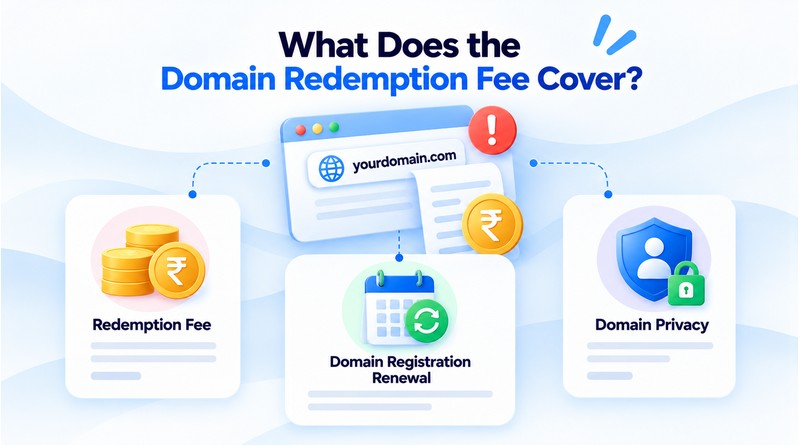
Redemption Fee
This is the administrative cost the registry charges to restore the domain registration. It is separate from and in addition to the renewal fee.
Domain Registration Renewal
Redeeming the domain also renews the registration for one year. This is the same fee you would pay for a normal renewal, added to the redemption fee.
Domain Privacy
If you had domain privacy enabled before the domain expired, restoring privacy protection adds a third charge. The fee only appears if your domain had privacy active at the time of expiration.
Also Read: What Happens If You Don’t Renew Your Domain?
How to Recover an Expired Domain?
The right fix depends entirely on which window you are in. Run a quick WHOIS lookup on your domain first; the status field tells you exactly where you stand (ok/grace, redemptionPeriod, or pendingDelete). Then follow the matching path.
In the Grace Period? Follow These Steps
Log in to the domain registrar (not your web host, unless they are the same; verify the WHOIS “Registrar” line if unsure).
- Find the expired domain in your dashboard. It will usually show an overdue Renew button.
- Pay the standard renewal. No penalty applies here.
- Confirm that the status returns to active and note the new expiry date.
That’s it. If you act quickly, completing the entire process described in this article can take just five minutes.
If You’re in the Redemption Period
You cannot restore a redemption domain yourself through the dashboard. The standard “Renews” button is dysfunctional because the domain is out of its active zone.
Contact your registrar’s support directly and request a redemption/RGP restoration.
Confirm the total: The total cost includes the redemption fee, which ranges from approximately $80 to $200, in addition to the standard renewal fee. Ensure you finalize the number of domains you wish to purchase.
Complete the restore payment. The registrar files for restoration with the registry.
Allow up to 24-48 hours for the domain to return to active status and for DNS to fully repropagate.
If You’re in Pending Delete
There is no recovery action during pending delete; it is a locked 5-day countdown. You only need to prepare for re-acquiring the domain name the moment it drops:
Place a backorder for the domain through a drop-catch service so an attempt fires automatically at release.
If the name isn’t contested, simply re-register it fresh once it becomes available; for a .com domain name, that’s the normal $13.99 per year.
If you lose it to a catcher, don’t panic; buy from a squatter at inflated prices. Consider a strong alternative instead; our breakdown of .com vs. .org, or .com vs. .in, walks through the best domain alternatives for branding.
Also Read: .io vs .com
Why Do Domains Expire? The Causes We See Most
The real triggers for domain expiration during the registration period include:
- Failed auto-renew payment: Factors like card expiry, exhausted credit limits, or fraud detection disable the auto-renew feature. It disrupts the renewal process.
- Renewal emails filtered: Many renewal-related emails go unnoticed. If these emails are legitimate, they may end up in the junk folder, and we do not receive prior information to renew services.
- Wrong or stale registrant contact: an old employee’s address, a defunct email, or a former agency’s account.
- “I’ll do it later”: The domain was low-priority until the website went dark.
Conclusion
Losing a domain to the redemption phase is a stressful and costly wake-up call for any website owner. While the financial sting of a redemption fee is painful, paying it is almost always worth the investment if the domain has SEO authority, brand equity, or vital operational history. Letting a valuable domain lapse completely into the public pool exposes your brand to drop-catchers, domain squatters, and competitors who permanently hijack your digital footprint.
Moving forward, treat the domain as the foundational asset it is. An absolute way to ensure its efficiency is to log into your registrar today. Then, enable auto-renewal, and keep the credit card active to avoid the domain going into a redemption period. A few minutes of proactive account maintenance will save you hundreds of dollars and protect the online identity you’ve worked so hard to build.
FAQs
1. How do I check if my domain is in the redemption period?
.Search for your domain name using a public ICANN WHOIS lookup tool. Look closely at the “Status” field; if it explicitly displays redemptionPeriod, your domain is currently in this restricted phase.
2. Is the redemption fee a one-time charge?
Yes, the redemption fee is a one-time penalty fee charged strictly to restore the domain from the registry’s deletion queue. However, you will also have to pay your registrar’s standard annual renewal fee at the same time to extend its life for the next year.
3. Can I recover a domain myself, or do I need registrar help?
You must contact your registrar for assistance because domains in redemption are locked out of normal user dashboards. Their customer support team must manually process the steep penalty payment and submit a restoration request to the central registry on your behalf.
4. What happens to my old website files during redemption?
Your website files and database remain completely safe on your web hosting provider’s servers because hosting and domain registration are separate services. However, because the domain link itself is broken, the public will see an error page instead of your website until the domain is restored.