

 Gaurav Bodhare
Open five terminal windows, start five containers manually, and try remembering which one needs to boot before the others. That’s the daily reality for anyone running a multi-container application without a proper orchestration layer, and it gets old within the first week. A single typo in the wrong terminal window, and an entire afternoon disappears into debugging a problem that never should have existed.
Docker Compose exists to remove that manual juggling entirely, letting a developer define an entire application stack in one file and bring it to life with a single command. Setting this up correctly on the right infrastructure, whether that’s a local machine or a full web hosting environment, changes how a team ships software day to day.
In this post, we’ll cover what Docker Compose actually is and how it processes a request. We’ll also look at the docker-compose.yml file and the commands you’ll use most.
Table Of Content
What is Docker Compose?
Docker Compose is a tool that lets developers define and run multi-container Docker applications using a single YAML file, instead of starting each container manually with separate commands. One file describes every service an application needs, how they connect, and what settings each one requires, and one command brings the entire setup online. Anyone searching through Docker Compose examples online quickly notices the same pattern repeating: a handful of services, a shared network, and a command that starts everything together in the right order.
Related Read: Docker Container: What is it and what are its advantages?
What are the three steps behind every Docker Compose run?
Every Compose workflow follows the same rhythm, regardless of how complex the application gets underneath. Once a developer understands these three stages, reading someone else’s Compose setup stops feeling like decoding a puzzle and starts feeling familiar within minutes.
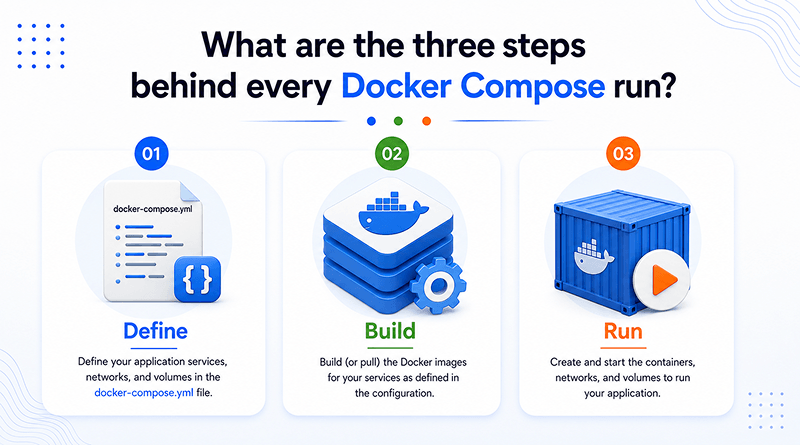
1
Define
A developer writes a
docker-compose.yml file that describes each service, the image it uses, and how those services connect to one another.
2
Build
From that file, Compose either constructs a fresh image using a Dockerfile or fetches one already sitting in a registry.
3
Run
A single command starts every container in the correct order, wires up networking, and keeps the whole stack running together.
How does Docker Compose work?
Utilizing that single command, docker-compose up, Docker Compose creates a dedicated network for the project so every container can reach the others by service name instead of a manually tracked IP address. This shared application layer is what lets a web service talk to a database container without either one knowing the other’s physical location on the host machine.
Compose also tracks dependencies declared in the file, starting containers in the order they actually need each other rather than all at once. Without that ordering logic, an application container could easily try connecting to a database that hasn’t finished starting yet, causing a failure that looks far more complex than it actually is.
What is a Docker Compose File?
A docker-compose.yml file defines the blueprint for the entire application. Each service gets its entry, listing the image or build context, the ports it requires, and any volumes or environment variables tied to it. Before Compose, this information usually lived in a README, a wiki page, or worse, in someone’s head, and updating it meant tracking down whoever wrote it last. A new developer joining a project can read through it once and understand exactly how every component of the application integrates, without asking a single question.
Related Read: How to Install LangFlow with Docker Compose (Step-by-Step Guide)
What is a docker-compose.yml file?
It’s a single YAML file that defines an entire multi-container application in one place, instead of running separate docker commands for every piece. Each service block carries its image or build path, ports, and linked volumes underneath it. Environment variables and dependency order often sit alongside those, letting one service wait for another to be ready before it starts. Toward the bottom of the file, networks give every service a shared space to communicate, with no extra setup required.
What are the key fields in a docker-compose.yml file?
A small set of fields show up in nearly every configuration, no matter how big or small the project gets.
services
Every container the application runs lives here, one block per service, forming the core of the file.
image
Pulls a prebuilt image directly, skipping a custom build step entirely.
build
Rather than pulling from a registry, this field tells Compose to build the image locally from a Dockerfile.
ports
A container maintains its internal port, and this field establishes a mapping to a port accessible from the host machine.
volumes
This is how Docker Compose volumes work, keeping data alive outside whatever happens to the container itself.
environment
Environment variables land inside a container at startup through this field, no hardcoding required.
networks
Services find each other through this field, and it’s also how parts of a larger stack stay isolated when needed.
depends_on
A database finishes starting before the application ever tries reaching it, thanks to this one setting.
Related Read: How to Run Grafana with Docker? (Step-by-Step Guide for Beginners)
What are the essential Docker Compose commands you should know?
A few essential commands cover most of what a developer requires in daily work.
$docker-compose up
$docker-compose down
$docker-compose restart
$docker-compose ps
$docker-compose logs
$docker-compose exec
Related Read: Docker vs Kubernetes – Understand the Difference
What are some real-world use cases for Docker Compose?
Compose turns up constantly across modern development work, far past simple demos. What started as a convenience for local development has quietly become a standard piece of the toolkit for teams shipping software of almost any size.
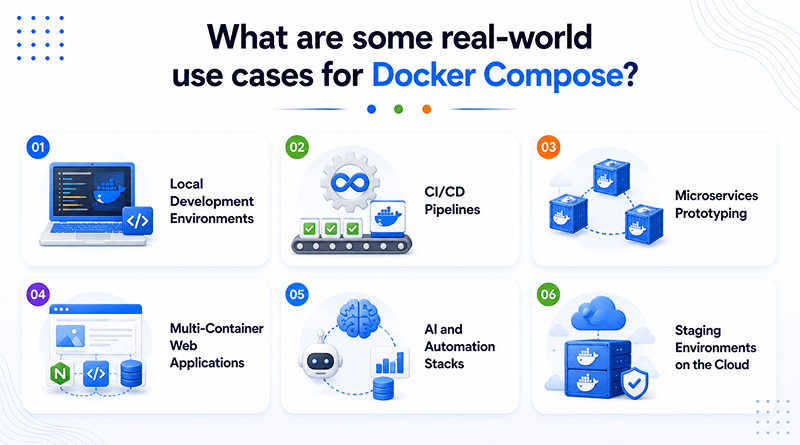
- Local Development Environments: A full application stack, including a database and cache, spins up identically on every developer’s machine.
- CI/CD Pipelines: Compose starts every dependency a test suite requires, runs the tests, then removes the entire setup once finished.
- Microservices Prototyping: Teams building on container orchestration tools test how services communicate locally through Compose, well before any of it reaches Kubernetes in production.
- Multi-Container Web Applications: This kind of setup usually pairs a web server, an application server, and a database, with SSL security handled at the reverse proxy layer.
- AI and Automation Stacks: Newer projects running autonomous systems like Agent Zero AI increasingly depend on Compose to keep the model, database, and browser components running as one unit.
- Staging Environments on the Cloud: Deploying Compose-based stacks onto cloud hosting has become common practice, since it mirrors production closely enough to catch issues before an actual release.
What are the pros and cons of Docker Compose?
Like any tool, Docker Compose fits some situations far better than others, and knowing where it stops being the right choice matters just as much as knowing where it shines.
Pros
SimplicityA single file and a single command take the place of a long list of manual steps every developer would otherwise repeat.
ConsistencyFrom a laptop to a staging server, every environment runs the exact same configuration.
Same Setup EverywhereDevelopment, staging, and testing all read from the same compose file, so nobody’s guessing whether their local setup actually matches anyone else’s.
Cons
Not Built for Production ScaleCompose was built for one host. The moment traffic demands multiple machines working together, teams search for platforms like Kubernetes instead.
Limited to Docker EngineEvery part of Docker Compose runs on top of Docker Engine, so without it installed and running, none of this works.
Manual ScalingNo instance appears without a person typing the command first. Traffic spikes come and go without triggering any response.
Docker vs Dockerfile vs Docker Compose — What’s the difference?
These three terms often get confused, though each one covers a different part of the container workflow.
| Feature | Docker | Dockerfile | Docker Compose |
|---|---|---|---|
| Function | Platform for container execution. | Script for image creation. | Orchestration for multi-container apps. |
| Scope | Manages system-wide containers. | Defines a single service image. | Coordinates multiple connected services. |
| Format | Runtime engine environment. | Text-based instruction set. | YAML configuration file. |
| Lifecycle | Provides container runtime. | Acts as a build-time blueprint. | Manages startup/shutdown sequences. |
Concluding Insights
Docker Compose simplifies manual container management by consolidating configuration into a single readable file and executing the entire setup with one command. From local development to CI pipelines to full staging environments, it eliminates hours of repetitive setup work every single week. Anyone who tries a Docker Compose tutorial for the first time often recognizes the efficiency they lacked previously.
As development teams keep building more complex, multi-service applications, tools like Docker Compose are becoming a bigger part of everyday DevOps tools and workflows. A stable setup, paired with regular maintenance, keeps a Compose-based stack dependable for years, letting a team focus on building rather than manually monitoring individual containers. While the tool operates quietly in the background, the time it saves results in a clear efficiency gain that every team eventually recognizes.
Frequently Asked Questions
1. What is Docker Compose used for?
Running an application that spans several containers usually means starting each one separately and hoping the order works out. Compose replaces that with one file and one command, and everything comes up together the way it’s supposed to.
2. What is the difference between Docker and Docker Compose?
Docker deals with one container at a time, through commands typed one after another. Compose manages entire groups of containers through one central file, instead of handling each one on its own.
3. Is Docker Compose part of Docker?
It comes bundled with Docker on most installations today, so a separate install usually isn’t needed. Fundamentally, it still depends entirely on Docker Engine to actually run anything.
4. What language is the Docker Compose file written in?
YAML. Indentation does the work that brackets or tags would do in other formats, which is part of why the files stay easy to read even months later.
5. Who uses Docker Compose?
Developers frequently utilize it for local testing, as deploying a database alongside an application should not require five distinct commands. Testing pipelines and small staging setups lean on it too, mostly because the result stays the same no matter who runs it or where.